
Babel
A free, open-source Docker app that waits for Bazarr to find subtitles in your language and, when it can't, translates an existing subtitle track with the AI provider you choose or a local Ollama model, then checks the result before saving it next to your video.
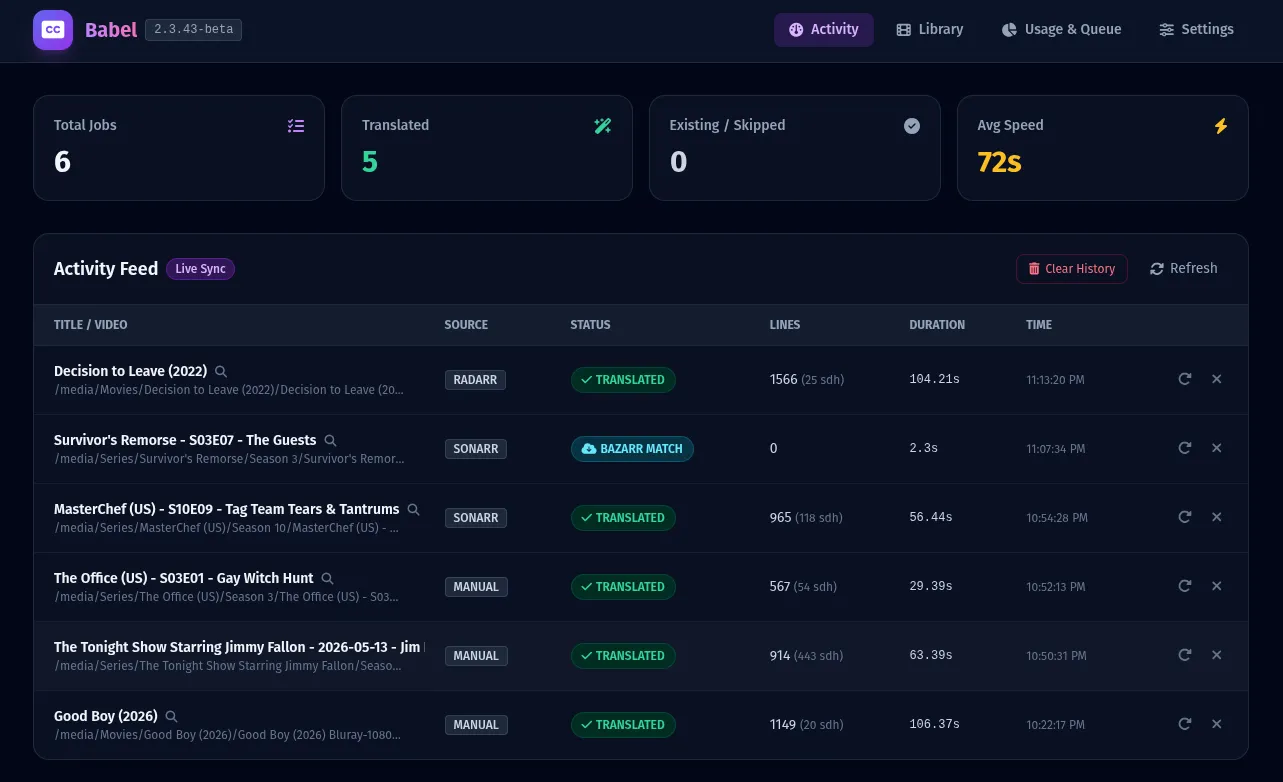
Short description
Babel is a subtitle tool you run on your own server, made for people who use Sonarr, Radarr and Bazarr to manage their TV and movie libraries. It covers one gap: a video has subtitles, but not in the language you want. When Sonarr or Radarr adds a file, Babel checks whether a subtitle in your language already exists. In Hybrid Mode it asks Bazarr to look for a human-made one, while getting a source subtitle ready at the same time. That source can be a text track inside the MKV or MP4 file, or a separate file such as .en.srt.
If Bazarr finds a match, Babel uses it and makes no AI calls. If not, Babel translates the source in batches, runs several repair passes, and refuses to save the file if its quality check finds missing lines, the wrong language or changed timings. It doesn't turn speech into text, so a video with no usable text subtitle needs a speech-to-text tool such as Whisper first.
Babel is free under the MIT license. Translation runs on your own API key, a personal access code you get from Gemini, OpenAI, Anthropic, DeepSeek, OpenRouter, DeepL or any OpenAI-compatible service, so you pay that provider. A local Ollama model costs nothing to run. Hugo Mossberg builds it. The repository was created in August 2026, the first beta (v2.3.33-beta) came out on August 24, 2026, and the current version is v2.5.7-beta from November 2, 2026. It's still a public beta.
Features
Bazarr first, AI as backup: In Hybrid Mode, Babel starts a Bazarr search for your language while preparing the AI translation, then checks again right before the first AI call. If Bazarr found a subtitle, Babel uses it and makes no AI calls.
Optional wait for Bazarr: Holds off on AI translation for new files for up to 365 days (the default is no wait), checking at most every 15 minutes. Waiting jobs survive restarts, and a "Translate now" button skips the wait. This needs Hybrid Mode and a Bazarr API key.
Pure AI Mode: Skips Bazarr entirely and translates the subtitle track inside the video straight away.
Subtitles from inside video files: Pulls text subtitle tracks out of MKV and MP4 files with ffmpeg and mkvextract. If that isn't possible, it falls back to a separate subtitle file or one Bazarr downloaded.
Skips work already done: Spots subtitles in your language that are already on disk, including ones inside the video, and doesn't translate again.
Choose your AI provider: Gemini (default model gemini-3.5-flash-lite), OpenAI (gpt-4o-mini), Anthropic (claude-sonnet-5), DeepSeek (deepseek-flash), OpenRouter, DeepL, any custom OpenAI-compatible service, and local Ollama (llama3 by default). Babel pulls the current model list from each provider.
Translation in batches with context: Sends subtitles in chunks of 50 lines by default, and supports glossaries per series so names and terms stay the same across episodes.
Repair passes: Re-translates missing lines, retries hard lines with the surrounding dialogue as context and runs a final rescue pass. It also spots when it's stuck retrying and stops.
Three-level quality check: PASS saves the file. PASS_WITH_WARNINGS allows at most 3 unresolved lines and at most 1% of the file by default, and you can change those limits. FAIL blocks the file for broken structure, dropped lines, damaged timings or the wrong language.
Exact timings kept: Translates line by line and keeps each line's original start and end time with zero drift. A cleaner for subtitles made for deaf and hard-of-hearing viewers replaces sound notes such as [door closes] without changing the number of lines.
26 target languages: Including Swedish, English, German, French, Spanish, Japanese, Chinese, Korean, Polish and Finnish, with European and Brazilian Portuguese as separate options, and Serbian, Croatian and Bosnian as separate languages.
Web dashboard and one-click updates: Shows an activity feed, your library, manual processing, AI usage with cost estimates and a queue of jobs waiting on Bazarr. An optional updater container installs new versions and rolls back if the app doesn't come up healthy.
Pricing
Babel itself costs nothing. If you use a cloud AI service for translation, that service bills you for what you use. A local model runs on your own computer, so there's no fee.
Babel: Free and open source under the MIT license. There's no paid plan, hosted version or account.
Cloud AI providers: You enter your own API key for Gemini, OpenAI, Anthropic, DeepSeek, OpenRouter or DeepL in Babel's settings and pay that provider directly. Babel's dashboard shows your usage and estimated cost. The repository doesn't publish a typical cost per file.
Local Ollama: No API cost. Translation runs on your own hardware, and speed and quality depend on the model, your hardware and the language pair.
Integrations
Platforms: Runs on your own server with Docker (Linux on standard Intel or AMD processors), managed through a web dashboard in your browser. There's no official image for ARM processors yet, and the research doesn't mention a desktop or mobile app.
Sonarr: Sonarr sends Babel an automatic notice (a webhook) at /webhook/sonarr when a file is imported or upgraded, with an optional secret to secure it.
Radarr: Sends the same webhook at /webhook/radarr on import and upgrade.
Bazarr: Connects with Bazarr's address and API key, for Hybrid Mode searches and the waiting period.
Jellyfin: Tells Jellyfin to refresh its library after saving, so the new subtitle shows up without a manual scan.
Plex: Refreshes the Plex library after saving, added in v2.5.0-beta.
AI providers: Gemini, OpenAI, Anthropic, DeepSeek, OpenRouter, DeepL, Ollama and any custom OpenAI-compatible service.
Docker: The image is ghcr.io/hugomossberg/babel, installed with Docker Compose v2. You give the container access to your TV and movie folders, and a path mapping setting handles cases where Sonarr or Radarr see those folders at a different path.
Platforms
- Self-hosted with Docker on Linux
- web dashboard in the browser
What users love about Babel
Usable subtitles when nothing else turns up: A Reddit user who has run it for about two months says it produces very usable subtitles when they need them, and another user reporting a styling bug on GitHub noted the translated text itself was accurate.
Cheap models can run the whole process: A user who already used OpenRouter says the added DeepSeek and OpenRouter support solved one of the last problems in their media setup and let them automate translation with low-cost models.
Quick, careful fixes during the beta: A tester who ran Babel's checker over 500 real Serbian subtitle files saw the pass rate go from 0% to 98% after one round of fixes, and thanked the maker for fixing issues quickly and treating Serbian, Croatian and Bosnian as separate languages.
What users complain about Babel
The quality check has blocked correct translations: Users reported good Polish and Finnish translations rejected as English, Italian ordinals such as "10ª" failing whole films, and ordinary Serbian words read as Macedonian. Each was fixed in a later beta, but until then they paid for AI usage and got no subtitle.
Beta rough edges in setup: Users hit a web dashboard that froze during scans and showed empty libraries, a Jellyfin connection test that failed, oversized subtitle text after conversion, and existing or embedded subtitles that weren't detected. Most were fixed in v2.5.6-beta.
Slow local hardware timed out: A user running Ollama on a processor alone, with no graphics card, saw repair passes fail every 60 seconds while the model was still answering. A timeout setting now exists, but you have to raise it yourself.
Thin docs and install options: One early user found the Sonarr trigger names in the docs didn't match Sonarr's, and others asked for an Unraid template and an ARM64 image. Neither is official yet.
Gaps in languages and replacement: A Brazilian Portuguese user still got European Portuguese after the Brazilian option was added, people who want Arabic or other unlisted languages can't add them, and an AI subtitle isn't replaced if a human-made one appears much later.
Frequently asked questions about Babel
Can Bazarr translate subtitles with AI?▼
Babel adds this next to Bazarr, so you keep using Bazarr as before. In Hybrid Mode, Bazarr searches for a subtitle in your language first. If it finds nothing, Babel translates an existing subtitle track with the AI provider you set up and saves the result next to the video. You connect it with Bazarr's address and API key, and you can set a waiting period of up to 365 days so Bazarr gets more time before the AI steps in.
How do I translate embedded subtitles in an MKV file?▼
Babel pulls text subtitle tracks out of MKV or MP4 files using ffmpeg and mkvextract, then translates them line by line while keeping the original timings. It runs automatically when Sonarr or Radarr imports a file, or you can start a job by hand from the web dashboard. Subtitle tracks stored as images, or missing tracks, can't be used as a source.
Can Jellyfin or Plex auto translate subtitles?▼
Not on their own, but Babel can translate in the background and then tell them to refresh. After a translated subtitle passes the quality check and is saved, Babel triggers Jellyfin's library refresh, and Plex library refresh was added in v2.5.0-beta. Sonarr and Radarr webhooks start the translation when a file is imported or upgraded.
How do I translate an SRT file with AI for free?▼
Babel is free under the MIT license, and with a local Ollama model there are no API fees because translation runs on your own machine. Cloud providers such as Gemini, OpenAI, Anthropic, DeepSeek, OpenRouter or DeepL need your own API key, and you pay them for what you use. On slow hardware or a computer without a graphics card, raise the AI request timeout (1 to 3,600 seconds) in the settings.
Can AI generate subtitles from audio for Bazarr?▼
Babel doesn't do this. It only translates existing text subtitle tracks, either inside the video or in a separate file. The repository says a speech-to-text tool such as Whisper is the right first step for videos with no usable subtitle track.
Similar tools
Alternative AI options