CutVoke
A free, MIT-licensed video editor that runs on your own Windows, Mac or Linux computer, where an AI agent such as Claude Code, Codex or Cursor makes the first cut and you finish it by hand on the same multitrack timeline.
Short description
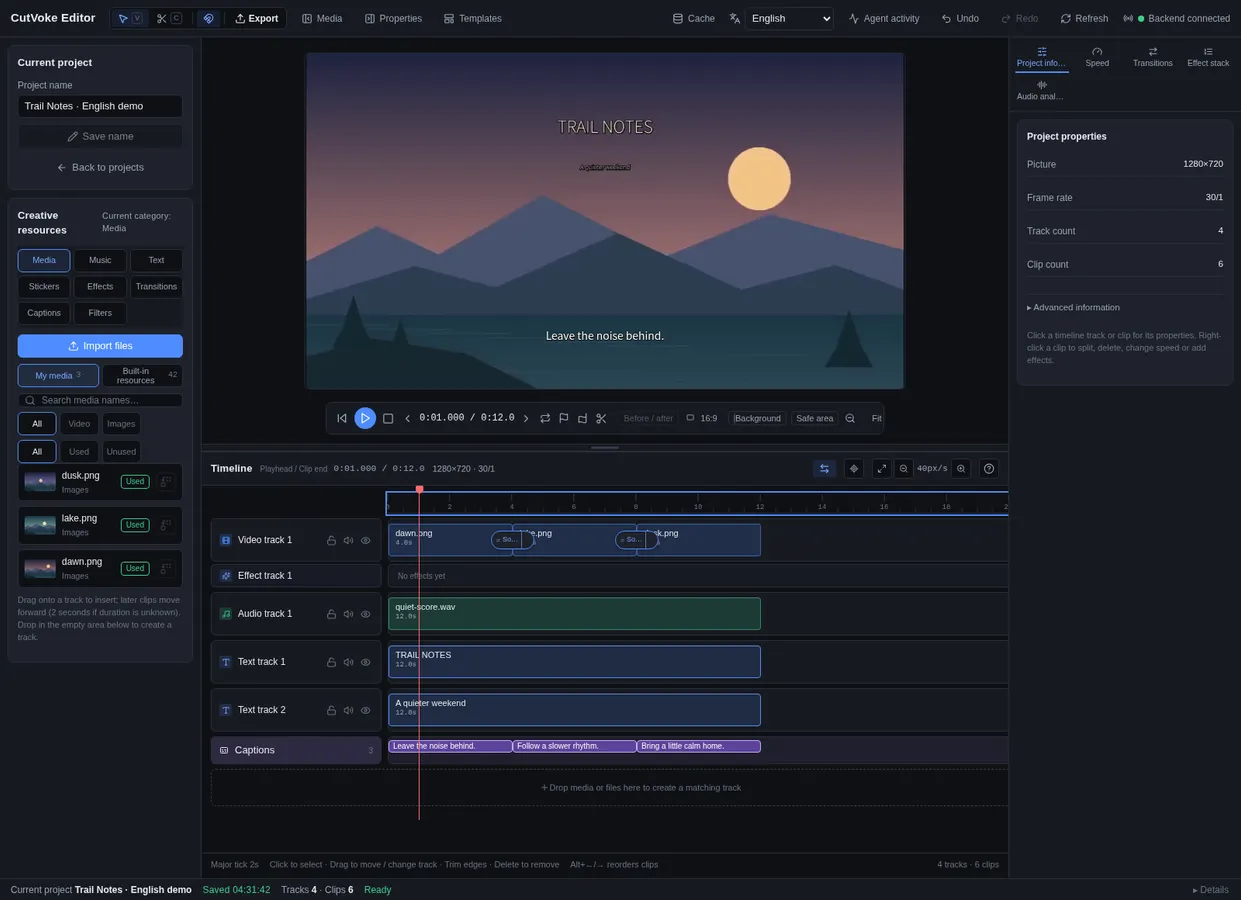
CutVoke is an open-source video editor built for a person and an AI agent to work on one project together. The agent connects through MCP, a standard way to plug outside tools into an AI assistant, and handles the rough cut: trimming silences, adding captions, making a 9:16 version, placing transitions. Then you open that same timeline in the visual editor and change any clip, caption or keyframe yourself. If one subtitle is wrong, you fix that subtitle and export again.
The app has no AI model of its own. You connect the agent you already use, such as Claude Code, Codex, Cursor or Claude Desktop. Editing, rendering with a bundled copy of FFmpeg, and speech-to-text captions all run on your computer, and local editing needs no account. The editor has multiple tracks, cutting by transcript, keyframes, moving masks, track mattes, 3D layers and community effects stored as editable recipe files.
The maker pitches it as an alternative to the MCP server in Instagram Edits, which the maker says is Mac-only and needs an Instagram sign-in. CutVoke is still a prerelease. The GitHub repo was created in September 2026, the first desktop builds (v0.3.1) came out in October and the current version, v0.3.5, shipped on November 8, 2026. The builds are unsigned, and the project format may still change. It suits creators and developers who already work with an AI coding agent and want to hand it the tedious parts of an edit.
Features
AI agent control over MCP: Claude Code, Codex, Cursor, Claude Desktop or any other MCP client can inspect a project, try out commands, apply edits and export. The app writes a ready-made MCP config file on first launch, so the desktop build needs no Python install.
One timeline for agent and human: The agent and the visual editor change the same saved project. While an agent is editing, the editor shows which agent holds the project and for how long, and a "Take over editing" button hands control back to you.
Dry runs and before/after frames: The agent can preview a command without applying it and pull before and after images at 1 to 3 points in the video, so it can check its work before exporting.
Cutting by transcript: Find, play and delete clips by word or sentence, see what each cut affects, and undo it in one step.
Offline auto-captions: Speech recognition runs on your computer with faster-whisper, using the Base model by default or Tiny for quick checks. It uses an NVIDIA graphics card when one is available and the CPU otherwise. Captions come in as an editable draft, export as SRT files and are burned into MP4 exports.
Multitrack timeline: Video, audio, adjustment layers, nested compositions, stickers, motion titles and subtitle tracks, with trims that never touch the original files and Bezier keyframes.
Masks, mattes and effects: Moving masks, Alpha and Luma track mattes, color grading and atmospheric overlays.
3D layers and person cutouts: 3D planes, meshes, materials and lighting drawn with OpenGL, plus optional local models that cut a person out of the background.
Audio mixing: Mixes several audio tracks and lowers background music under speech or ambient sound.
Community effects as recipes: Transitions, effects and motion titles are readable files in the repo that anyone can change or contribute to.
Agent skill with genre guides: A bundled cutvoke-editor skill teaches agents how the timeline works, with editing guides for music videos, documentaries and vlogs, short films, explainers and product showcases.
Portable project packages: A .cutvokepack file bundles a project so it can be opened on another computer. Videos export as MP4 or WebM.
Pricing
Free and open source: MIT license, with no paid plan, no account for local editing and no cloud or per-minute fees. The AI agent you connect, such as Claude Code, Codex or Cursor, is a separate product with its own pricing.
Integrations
Claude Code, Codex and Cursor: The repo has a setup guide for each, and the agent talks to CutVoke's MCP server directly on your computer.
Claude Desktop and other MCP clients: Any client that can run a local MCP server can use the cutvoke entry from CutVoke's config file.
FFmpeg: Comes bundled in the desktop builds for rendering. Installing from source needs FFmpeg and ffprobe set up separately.
faster-whisper: Local speech recognition for captions. Models download the first time you use them and can be downloaded ahead of time for computers without internet.
HTTP API and command line: The cutvoke and cutvoke-mcp commands and an HTTP API cover batch renders and custom media pipelines.
Code-generated video import: Checks and imports videos made by code, with cached rendering.
Platforms
- Windows
- macOS
- Linux
- command line tool
- MCP server
Frequently asked questions about CutVoke
Can Claude Code edit videos?▼
Yes, with a tool like CutVoke. Launch the CutVoke desktop app once, copy the cutvoke entry from its profile/mcp-config.json file into Claude Code, and ask in plain language, for example to cut the silences, add captions and make a 9:16 version. Claude Code makes the edits on CutVoke's timeline, and you can open the same project and adjust anything by hand before you export.
Is there an Instagram Edits alternative for PC?▼
CutVoke runs on Windows, macOS and Linux and, like Instagram Edits on the Mac, gives AI agents an MCP server to edit with. Local editing needs no Instagram or other account, and the code is MIT-licensed. It's an early prerelease (v0.3.5), and because the Windows build is unsigned, Windows may show a SmartScreen warning when you open it.
Is CutVoke free?▼
Yes. CutVoke is open source under the MIT license, with no paid plan and no cloud or per-minute fees, because editing and rendering happen on your computer. The AI agent you connect, such as Claude Code or Cursor, is billed separately by its own provider.
Is there an open-source AI video editor for Linux?▼
CutVoke has a Linux desktop build alongside the Windows and macOS ones. It supports Ubuntu 22.04 or newer with a graphical desktop, and FFmpeg is bundled, so basic editing needs no Python, Node.js or FFmpeg install. On Ubuntu 24.04, AppArmor security settings may block the app's sandbox until an administrator adds a policy for it.
Does CutVoke upload my videos?▼
No. Editing, rendering and speech-to-text captions run on your own computer, and choosing the graphics card or CPU for captions only changes where the model runs. What your AI agent sends to its own provider depends on that agent.
Similar tools
Alternative AI options