
Kino
A desktop video editor, footage library and review tool in one, where Claude Code, Codex and your teammates edit the same live timeline and the whole project is stored as Remotion code, free to start or $25 per editor a month for unlimited agent calls and review links.
Short description
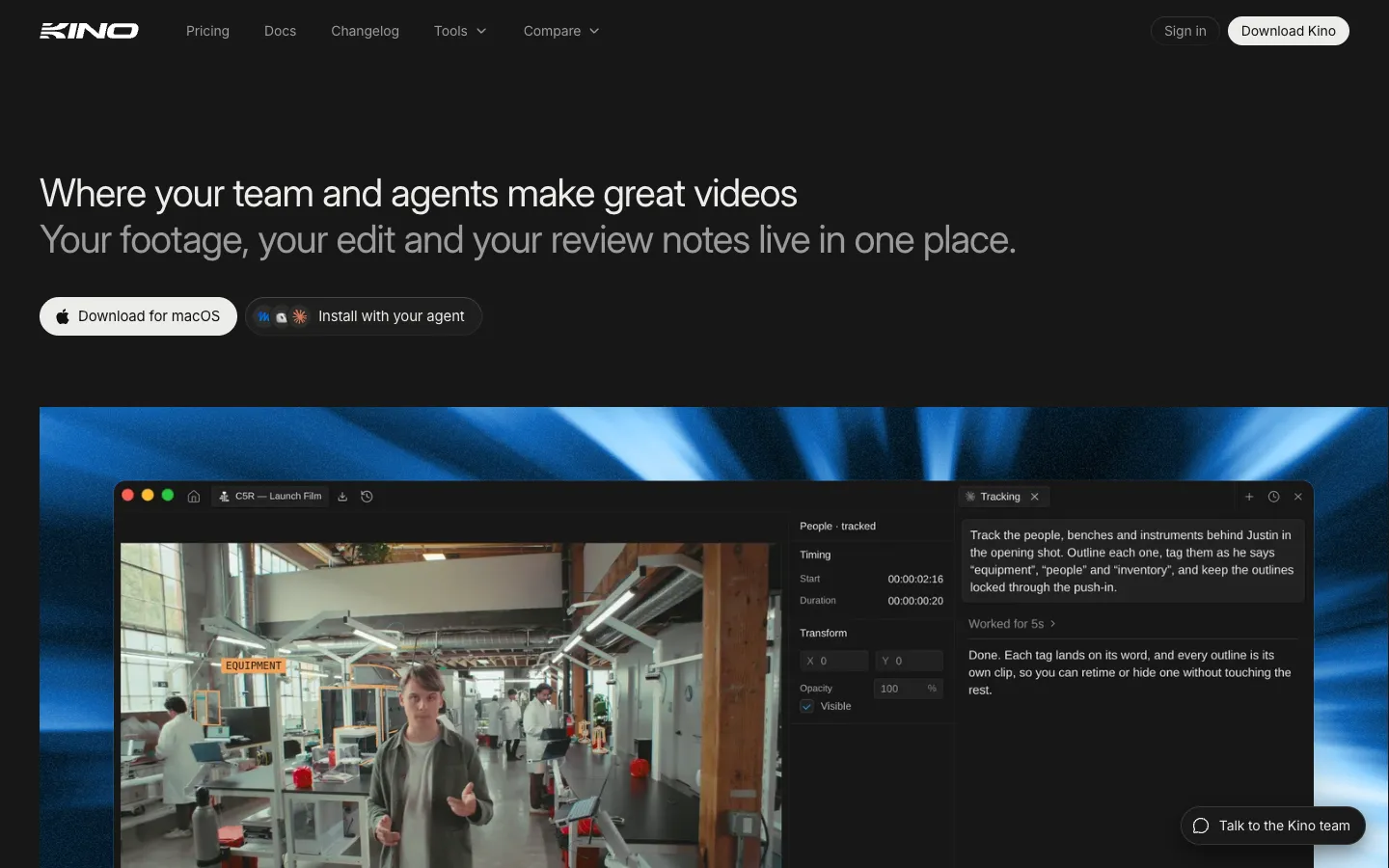
Kino is a video editor where your AI coding agent and your team work on the same project at the same time. You drag footage in and ask Claude Code, Codex, ChatGPT or Cursor for a cut through Kino's MCP server, a standard way for AI agents to use outside apps. The agent leaves every clip on an ordinary timeline that you can trim, nudge and animate by hand. Teammates see each other's cursors and which layer an agent is working on.
Behind the editor, every edit, title, motion graphic and comment is code built on Remotion, a framework for making videos with React code. Everything has its own link, down to a single frame or comment, so you can paste a link to show an agent exactly what to fix. Kino transcribes your footage, describes it shot by shot, detects faces and makes it all searchable. The original files stay on your computer while lighter 720p copies sync to the cloud, and Kino plays camera formats such as RED, Blackmagic RAW, ProRes, DNxHR and MXF without converting them first. Clients can comment on an exact frame through a review link without making an account, and the agent can apply those notes.
It's aimed at founders and marketing teams making ads and explainers, and at filmmakers sitting on hours of camera footage. Kino AI went through Y Combinator in Summer 2023 and first sold on-premises footage tools for TV shows, then rebuilt the product as an editor in 2025. It opened to the public in November 2026 with a Launch HN post by co-founder Luke Igel.
Features
Agents edit the shared timeline: The desktop app runs an MCP server on your own computer, so Claude Code, Codex CLI, ChatGPT, Claude Desktop, Cursor and VS Code can search footage and edit projects from their own chat while you work alongside them.
Built-in Kino Agent: A chat agent inside the app runs Claude, GPT or Grok models paid through your Kino plan, or runs Claude Code and Codex on the Claude or ChatGPT plan you already pay for.
Timeline stored as code: Cuts, motion graphics, 3D scenes and comments are saved as Remotion (React) code, with a visual editor on top for dragging clips, keyframes and text by hand.
Live editing together: Teammates' cursors, the part of the timeline each person is watching and the layer each agent is changing all show up live, like a shared Google Doc.
Searchable footage library: Every clip is transcribed with timing for each word, described shot by shot and tagged with who's in it. You can filter by codec, camera, lens and shoot day, and smart folders fill themselves as footage arrives.
Camera files without converting: Plays RED R3D, Blackmagic RAW (including URSA Cine 12K), ProRes, DNxHR, MXF and Avid OP-Atom as they are. Originals play from your computer, and 720p copies sync to the cloud.
Review and delivery links: Share a link and viewers comment on the exact frame from a browser with no account. Comments land on the timeline, and the agent can pick them up and make the change.
A link for everything: Projects, clips, comments, single frames and the line of code that draws them can all be linked, so you can point an agent at one item among thousands on the timeline.
Editing tools: Ripple trim, slip and razor tools, audio ducking (music that dips under speech), LUT import for color grading, speed presets, stabilization, Enhance Audio, eye contact correction, captions, and screen, camera and mic recording.
Templates and brands: 104 templates for titles, maps, captions and transitions, and you can publish your own projects as templates or brand kits for your team.
Finding and generating media: Search and download YouTube videos into the library, find stock B-roll, and have agents generate images, video (with Seedance 2.5), music and voice, billed at cost.
Round trip to other editors: Imports DaVinci Resolve projects with their tracks and Fusion titles, and exports editable Resolve, Premiere Pro or After Effects projects (beta).
Pricing
An "MCP call" below is one action your outside agent asks Kino to do, such as searching footage or making one edit.
Free: $0, no credit card. The full editor, unlimited imports and exports, live collaboration, unlimited guests, a small monthly allowance for Kino's chat agent and 100 MCP calls a week shared across your organization. Kino's plan data lists 5 GB of cloud storage for the lighter copies of your footage. Review links and unlimited MCP calls need a paid plan.
Editor: $25 per editor a month, or $240 a year ($20 a month). Unlimited MCP calls, shareable timeline and media links, more footage indexing, 50 GB of cloud storage and more Kino chat credits. Going over costs $1 per extra chat credit and $0.02 per GB of storage.
Editor Plus: $200 per editor a month, or $2,400 a year (no annual discount). Everything in Editor, plus $100 of agent credit and $75 of Seedance 2.5 video generation credit per editor each month (unused credit doesn't roll over), 4 TB more shared cloud storage, spending limits for agents, usage analytics, priority Slack support and an onboarding session. You can mix Editor and Editor Plus seats, and viewers are free.
Enterprise: Custom price. Custom AI usage, unlimited cloud storage, a dedicated account manager and custom contracts.
AI and generation costs: Your own Claude or ChatGPT plan pays for Claude Code and Codex. Kino's built-in agent bills its model usage through Kino. Media generation is billed separately, and Seedance video beyond the Editor Plus allowance costs what Kino's provider (reAPI) charges plus 5%.
Free tools: Kino Transcode converts BRAW, R3D, ProRes, DNxHR and MXF files to MP4 or ProRes in the browser, free and with no account.
Integrations
Coding agents through MCP: Claude Code, Codex CLI, ChatGPT desktop, Claude Desktop, Cursor, VS Code and any other app that supports MCP. In Claude Code you add it with
claude mcp add kino --transport http http://127.0.0.1:45680/mcp. The Kino desktop app has to stay open while the agent works.Cloud agents: Agents such as Devin, Grok Bot, Muse and Dot can install Kino for Linux on their own machine and edit while you're away. Servers with no screen can run it too.
Other editors: Imports DaVinci Resolve projects, and exports editable DaVinci Resolve, Premiere Pro and After Effects projects (beta).
Cloud storage import: Imports from Google Drive, Dropbox and Shade on paid plans.
Remotion: Projects are Remotion (React) code that agents read and write directly.
YouTube: Search and download YouTube videos into the footage library.
Generation models: Seedance 2.5 through reAPI, and fal.ai models for images, video, music and voice.
Platforms
- macOS
- Windows
- Linux
- MCP server
What users love about Kino
Easier to steer than a bare agent: A Hacker News user who made the same simple video in Kino and in plain Claude Code says Kino was far easier to nudge and control, and that it "just works".
Fast, cheap first cuts from real footage: An independent tester on the free plan gave Claude Code a 28-minute NASA film and got a 30-second trailer with titles in about five minutes for $2.56 in model costs, then a captioned vertical version in under seven minutes. The agent caught three of its own mistakes along the way.
Search that finds the moment: The same tester's plain-English searches, such as "astronaut next to the flag", landed on the right shot.
Comments the agent applies for you (vendor testimonial): A founder making short-form ads says their co-founder leaves notes on the share link and Kino applies them, which is how they ship ads that pay off for the business.
More videos than with a traditional editor (vendor testimonial): A musician and show host says they publish three times as many videos since moving from Final Cut to Kino.
Frequently asked questions about Kino
Can Claude edit videos?▼
Yes. Claude Code or Claude Desktop can edit videos in Kino through its MCP server, which runs on your computer inside the Kino desktop app. In Claude Code you add it with claude mcp add kino --transport http http://127.0.0.1:45680/mcp --scope user, then ask for a cut in plain words. The agent searches your footage, builds the edit on Kino's timeline and leaves every clip there for you to adjust by hand.
Is Kino AI free?▼
Yes. The full editor is free with no credit card, including unlimited imports and exports, live collaboration and 100 MCP calls a week for your own agents. Your Claude or ChatGPT plan pays for the model usage. The Editor plan ($25 a month, or $20 a month billed yearly) removes the weekly limit and adds review links and more storage.
Does Kino use Remotion for Claude Code video editing?▼
Yes. Every Kino project is Remotion (React) code, including cuts, motion graphics, 3D scenes and comments, so an agent reads and writes the project directly. On top of that, Kino adds a visual editor so you can drag a clip or move a title yourself instead of describing the change, plus footage storage and review links.
Can Kino open Blackmagic RAW, R3D and ProRes files?▼
Yes. Kino plays RED R3D, Blackmagic RAW (including URSA Cine 12K), ProRes, DNxHR and MXF exactly as the camera recorded them, with no conversion. The originals stay on your computer, and Kino uploads lighter 720p copies so teammates and cloud agents can see the footage.
Can I move a Kino project into Premiere Pro or DaVinci Resolve?▼
Yes, in beta. Kino exports a project as an editable DaVinci Resolve, Premiere Pro or After Effects project, and it can import Resolve projects with their video and audio tracks and Fusion titles.
Similar tools
Alternative AI options