MoneyPrinterTurbo
A free, open-source app that turns a topic or keyword into a finished short video with an AI-written script, voiceover, stock or AI-generated clips, subtitles and music, running on your own computer with whichever AI, voice and footage services you connect.
Short description
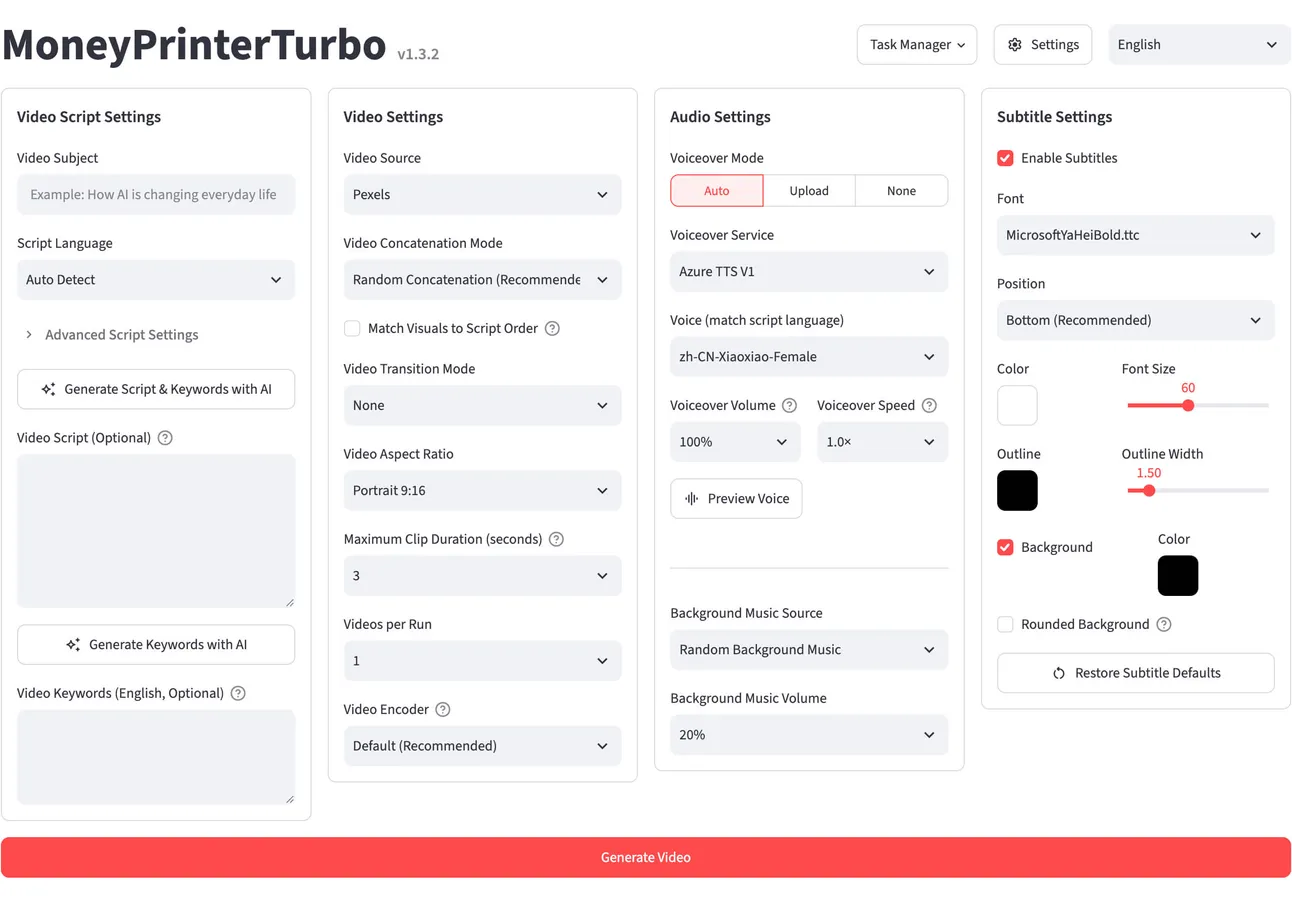
MoneyPrinterTurbo is an open-source Python app that makes short videos from one topic or keyword. You type a subject and a language model writes the script and picks search keywords. The app then pulls matching clips from Pexels, Pixabay or Coverr (or uses your own files or AI-generated clips), records a voiceover, times the subtitles, adds background music and renders an HD video in 9:16, 16:9 or 1:1. You can stop at any stage to change the script, the clips or the voice before it renders.
It runs on your own machine through a browser-based WebUI, a REST API, a command line or an AI agent skill, and you can also try it in Google Colab or Docker. You bring the AI. Free options include Edge TTS voices, Pexels footage and local models through Ollama, and paid ones include OpenAI, Claude, ElevenLabs and MiniMax video. Finished videos can go out to TikTok, Instagram and YouTube Shorts through a separate posting service called Upload-Post.
GitHub user harry0703 maintains the project, which has been public since March 2024 and is released under the MIT license, so anyone can use and change it, including commercially. By November 9, 2026 about 141,000 GitHub users had starred it and it had been forked about 22,600 times. The latest release is v1.3.10, from November 7, 2026. It's a fit for creators and developers who want faceless short videos in bulk with no monthly subscription and don't mind setting up API keys.
Features
Topic to finished video: Type a subject and it writes the script, picks footage, records the voiceover, adds subtitles and music and renders the video. You can step in and change any stage.
Your script or an AI one: Have AI write or rewrite the script in many languages, or paste in a complete script of your own.
Wide choice of language models: Kimi (the default in the sample settings), OpenAI, Claude, Gemini, DeepSeek, Qwen, Azure OpenAI, Grok, MiniMax and more. It also works through gateways such as OpenRouter and LiteLLM, with local models through Ollama, and with a ChatGPT subscription (signed in through OpenAI Codex) or a Claude Code subscription.
Stock footage or your own files: HD clips from Pexels and Pixabay (both need free API keys) and Coverr, or your own uploaded images and videos. You can adjust clip length, how clips fit the frame and their order.
AI-generated clips: Makes source footage with MiniMax H3 through Metaso (768p or 2K, 4 to 15 second clips), Volcano Engine Seedance, WaveSpeed AI, OFox, MuAPI (3 to 12 second clips) or any OpenAI-compatible image model, turning still images into moving clips.
Many voice engines: Edge TTS (free, no API key), Azure Speech, ElevenLabs, Google Gemini, MiniMax, Fish Audio, SiliconFlow, Xiaomi MiMo, self-hosted Chatterbox and Kokoro, and ModelBest VoxCPM, which can copy a voice from a reference clip of up to 20 MiB. You can also upload your own audio or leave the voice out.
Styled subtitles: Set the font, position, color, size, outline and background. Timing comes from the voice engine by default, or from Whisper speech recognition running on your computer (about a 3 GB model) when you need it more exact. Arabic script is supported.
Background music: Random, local or AI-generated tracks, each with its own volume control.
Three output formats: Portrait 9:16 (1080x1920), landscape 16:9 (1920x1080) and square 1:1 (1080x1080).
Batch generation: Makes several versions of one video at once, keeps a task history, and can queue up to 100 videos from a JSON file on the command line.
Posting to social platforms: Sends finished videos to TikTok, Instagram and YouTube Shorts through Upload-Post, which needs its own account and API key.
Four ways to run it: A WebUI in 14 interface languages, a REST API with built-in documentation, a command line, and an AI agent skill (a set of instructions an agent follows) that installs the app and makes a video from one prompt on macOS and Windows.
Editable local projects: An optional mode keeps revisions of a video, so you can swap the media in one scene and rebuild only the parts that changed.
Pricing
The app costs nothing. What you pay depends on the services you plug in, and each provider bills you directly.
Software: Free and open source under the MIT license. There's no paid plan, subscription or hosted version from the maintainer.
Free route: Edge TTS voices need no API key (the access code a service gives you to use it from other apps), Pexels and Pixabay need free API keys, and scripts can come from a local model through Ollama. That combination makes videos without paying for any service.
Paid services you connect: Language models, premium voices such as ElevenLabs or Azure TTS V2, AI video generation and Upload-Post posting are billed by each provider on your own account, and MoneyPrinterTurbo adds no fee. As one example, the README lists Metaso's MiniMax H3 video at CNY 0.09 per second for 768p and CNY 0.15 per second for 2K.
Sponsor offers: The README is full of sponsor and referral links to API providers, several with sign-up credit, such as a Kimi top-up bonus of 10% until December 31, 2026, $5 of Infistar trial credit and CNY 10 of Shengsuan Cloud credit. These are third-party offers and not part of the project.
Hardware: At least 4 CPU cores and 4 GB of RAM. The project recommends 6 to 8 cores, 8 GB of RAM and a graphics card with 4 GB or more of video memory for faster subtitle timing and batch work, though a graphics card isn't required.
Integrations
Language model providers: Kimi, OpenAI, Anthropic Claude, Google Gemini, DeepSeek, Alibaba Qwen, Azure OpenAI, Volcano Engine Ark, xAI Grok, MiniMax and Xiaomi MiMo, each with your own API key.
Model gateways and local models: OpenRouter, LiteLLM, OneAPI, Cloudflare AI Gateway, ModelScope, AIHubMix, AIML API, Groq, Pollinations AI, Shengsuan Cloud, APIMart and others. Gateways let one key reach many models. Ollama runs models on your own machine.
Subscription sign-in: Uses a ChatGPT subscription through OpenAI Codex sign-in or ChatGPT Native OAuth (depending on your account), or a Claude Code subscription, instead of paying per API call.
Footage libraries: Pexels, Pixabay and Coverr.
AI video and image services: Metaso MiniMax H3, Volcano Engine Seedance, Shengsuan Cloud, WaveSpeed AI, OFox, MuAPI, Infistar, Jalapeno Cloud and OpenAI-compatible image models, including image generation through a Codex sign-in.
Voice services: Edge TTS, Azure Speech, ElevenLabs, Google Gemini TTS, MiniMax, Fish Audio, SiliconFlow, Xiaomi MiMo, ModelBest VoxCPM, and self-hosted Chatterbox and Kokoro.
Whisper: faster-whisper, using the large-v3 model or the smaller large-v3-turbo, times subtitles on your own computer.
Upload-Post: Posts finished videos to TikTok, Instagram and YouTube Shorts with an Upload-Post API key.
AI agents: A skill file that any AI agent able to read skills and run terminal commands can follow to install the app, ask you for missing API keys and hand back a finished video, on macOS and Windows.
Platforms
- Windows
- macOS
- Linux
- Docker
- Google Colab
- command line tool
- API
What users love about MoneyPrinterTurbo
One topic in, a finished video out: People who have set it up describe typing a keyword and getting back a script, clips, voiceover, music and subtitles already edited together. For anyone posting short videos regularly, that saves hours of editing.
Free to run with your own keys: Users like that the app itself costs nothing and that bringing their own API keys lets them pick the providers and control what they spend.
Quick renders on a decent graphics card: One hands-on reviewer got a 60-second video rendered in about 2 to 3 minutes on an RTX 3060-class card.
What users complain about MoneyPrinterTurbo
Footage often doesn't match the narration: One tester found that clips are chosen from a few keywords for the whole topic instead of for each sentence. The visuals fit broad lifestyle subjects and drift away from anything specific.
Default results are only passable: Reviewers say quality depends heavily on the models and footage sources you connect, and that getting past generic faceless content takes tuning.
The free voice breaks: Many users report voiceover failures and 403 errors from the free Edge TTS voice. When it fails, the whole video stops until they switch voice or provider.
Setup takes work: Users run into Python package, FFmpeg and ImageMagick errors during installation, and one developer built a separate Windows version mostly to get around that.
Frequently asked questions about MoneyPrinterTurbo
Is MoneyPrinterTurbo free?▼
Yes. The app is free and open source under the MIT license, and there's no paid plan. You pay only for services you connect, such as a language model API, premium voices or AI video generation, and each provider bills you. With Edge TTS voices (no API key), Pexels or Pixabay footage (free API keys) and a local model through Ollama, you can make videos without paying for anything.
How do you use MoneyPrinterTurbo?▼
Install it with pip install mpt and start it with mpt webui, or use the Windows one-click package, Docker or the Google Colab notebook. Add your API keys in the WebUI settings, type a video topic, choose the voice, footage source, subtitles and aspect ratio, and generate. Videos are saved in the app's storage/tasks folder. You can also generate from the command line, through the REST API, or by giving an AI agent the project's skill file.
Where can you download MoneyPrinterTurbo?▼
From the GitHub repository harry0703/MoneyPrinterTurbo. Windows users can download the one-click .7z package from the Releases page (about 555 MB for v1.3.10). Everyone else can install the official PyPI package mpt or clone the repository. The README warns that the PyPI package named "MoneyPrinterTurbo" comes from a third party, not the project.
Is there a MoneyPrinterTurbo app for Android?▼
No. The project supports Windows 10 or later, macOS 11 or later and mainstream Linux distributions, and it runs as a local web app in your browser. To try it without installing anything, you can run it in Google Colab, and the README says RecCloud offers a free online video generator based on the project.
How do you make faceless videos with AI for free?▼
In MoneyPrinterTurbo you type a topic, and it writes the script, pulls stock clips from Pexels or Pixabay, adds an AI voiceover, subtitles and music, and renders a 9:16, 16:9 or 1:1 video with nobody on camera. To keep it free, use the Edge TTS voice (no API key), free Pexels or Pixabay keys and a local language model through Ollama. Check each video before posting, because clips are matched by keyword and may not fit every line.
Similar tools
Alternative AI options