PotionUI
A free, open-source studio you install on your own computer with an NVIDIA graphics card to make images, video and music with models like Flux, Qwen-Image, Krea-2, Wan, LTX and MiniMax-H3, using a simple form for each model instead of node graphs, with user accounts so a household or team can share one GPU.
Short description
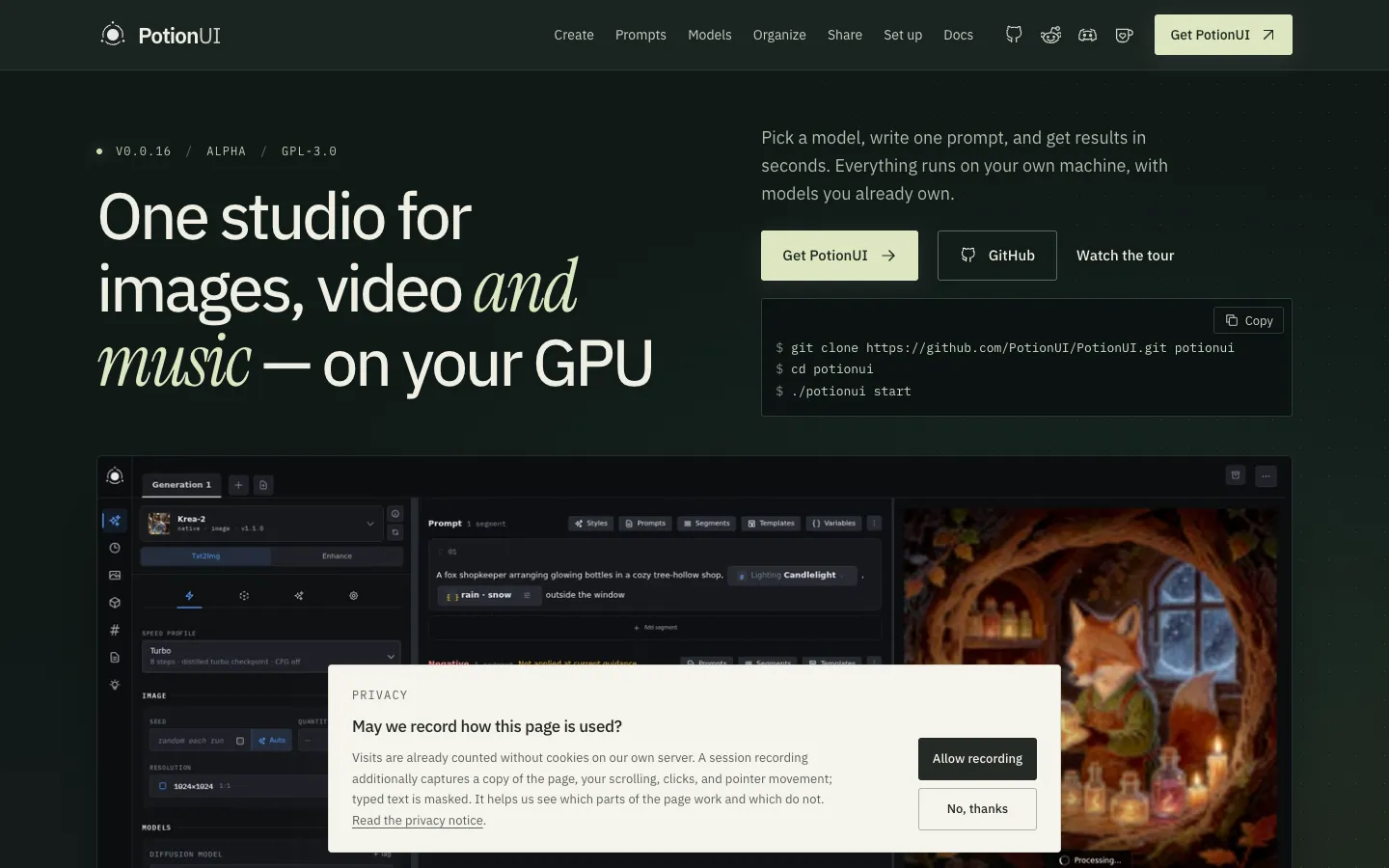
PotionUI is a free, open-source studio for making images, video and music with AI models on your own computer. You install it on a machine with an NVIDIA graphics card (GPU), open it in a browser, pick a model, fill in a short form made for that model and watch the result render live. There are no node graphs, the boxes-and-wires layouts ComfyUI uses. It runs open models including SDXL, Flux and FLUX 3 Klein, Qwen-Image 2.1, Krea-2, Z-Image, Anima, Wan 2.1/2.2, LTX-2 to 2.5, MiniMax-H3, YuE2 and SeedVR2, and reads model files from existing ComfyUI, Forge or A1111 folders.
Each model comes with modes. Qwen-Image can edit text inside a picture, restyle or restore a photo and combine up to nine reference images. LTX-2.5 can restore or colourise footage, relight day to night or turn a still into a cinemagraph, a photo with a small looping movement. MiniMax-H3 can extend, remix or upscale a clip and make a portrait talk.
Accounts, groups and an admin panel let one GPU serve a family or team, each person with their own presets, model access and limits. Without a local GPU you can send jobs to a PotionUI worker on another computer, or to cloud models from OpenAI, Google Gemini, Black Forest Labs or OpenRouter using your own API keys. PotionUI is alpha software built mainly by one developer. The GitHub repo went public in August 2026 and v0.0.18 shipped on October 30, 2026. The developer's location isn't published.
Features
A form for each model: Each model family has a form that shows only the controls it supports, with a mode picker that switches the form for tasks like edit, upscale or extend. You don't build node graphs.
Local image models: SDXL (text to image, inpaint, which redraws a chosen part of a picture), Flux 1 and FLUX 3 Klein, Qwen-Image 2.1 (edit, edit text, restyle, combine up to nine images), Krea-2, Z-Image and Anima.
Local video models: Wan 2.1/2.2, LTX-2, 2.3 and 2.5 (video with audio, plus Restore, Colorize, Day to night, Add water, Remove object, Cinemagraph, Extend and Refine faces modes), MiniMax-H3 (references to video, Extend, Remix, Talking video, Upscale) and SeedVR2 for upscaling.
Local music models: MiniMax-Music3 and YuE2 for making songs.
Cloud models with your own keys: Provider plugins for OpenRouter, Black Forest Labs, Google Gemini and OpenAI run cloud image and video models from the same Generate page. An API key is the password-like code a provider gives you to use its service on your account. Prices and per-job costs are shown to admins only.
Accounts and an admin panel: Create users and groups, choose who sees which models and presets, lock or hide form fields, and set limits for each user.
Video Director: Splits an idea into shots, can start each shot from the last frame of the one before, joins them into one film and retries a single failed shot.
Prompt tools: Saved prompt pieces, a phrasebook of styles and camera terms, variables, random choices written like {a|b}, and @ references to your own images, video and audio.
History, library and media tools: Every result is saved with its exact settings. You can tag, favourite and collect results, compare them side by side, and trim, crop, resize, change speed, colour key, split and join clips inside the app.
X/Y compare grids: Renders a grid of variations across two settings and stitches it into one labelled image.
AI assistant and MCP: Connect a chat AI model (Ollama, any OpenAI-compatible server, Anthropic, OpenAI, Gemini, OpenRouter) to rewrite prompts and adjust settings with your approval. MCP is a standard way for AI apps to use outside tools, so Claude Desktop or another MCP app can drive the studio with a separate access token for each user.
Guided setup: On first run, a guide checks your GPU, memory and disk, picks a starter model that fits, then downloads, installs and tests it.
Automations and plugins: Visual trigger, condition and action graphs (schedules, file watchers, graphics memory thresholds), and plugins that add backends, providers and pages.
Pricing
PotionUI costs nothing. What you pay for is the hardware it runs on, plus any cloud models you choose to use. VRAM below means the memory on your graphics card, which decides which models fit.
PotionUI itself: Free and open source under the GPL-3.0 license. No paid plans and no hosted version.
Hardware: You supply it. The minimum is 8 GB of VRAM and 16 GB of system RAM, enough for SDXL. 16 to 24 GB of VRAM and 32 GB of RAM is recommended. Larger models such as Qwen-Image, Flux 2 and Wan 14B need 16 GB of VRAM or more.
Cloud models (optional): Billed by the provider (OpenAI, Google Gemini, Black Forest Labs, OpenRouter) on your own account. PotionUI records each job's cost for admins.
Model files: Downloaded separately, and each model has its own license.
Support: Optional donations through Ko-fi.
Integrations
Platforms: You use it in a web browser, which also works on phones. The server runs on Linux with an NVIDIA GPU (tested), on Windows directly (experimental) or through WSL2, Windows' built-in Linux layer, and in Docker. It doesn't run on macOS or on AMD graphics cards. It also has an MCP server and an HTTP API, a way for other software to send it jobs.
ComfyUI: The comfyui-backend plugin uses a ComfyUI server to do the generating, and you can import your own ComfyUI workflows as presets.
Existing model folders: Reads models where they are in ComfyUI, Forge, StabilityMatrix and A1111 folders, without copying them.
Model downloads: Hugging Face and CivitAI providers for downloading models and LoRAs, small add-on files that adjust a model's style or subject.
Cloud providers: OpenRouter, Black Forest Labs, Google Gemini and OpenAI plugins, each needing your own API key.
Chat AI providers: Ollama, OpenAI-compatible servers, Anthropic, OpenAI, Gemini and OpenRouter for the assistant, plus a DeepSeek plugin.
MCP: Access tokens for each user let Claude Desktop or other AI agents generate and organise work in your PotionUI.
Pinokio: One-click install through the official PotionUI launcher for Pinokio, on Windows or Linux with an NVIDIA GPU.
Docker: A ready-made image at ghcr.io/potionui/potionui, which needs NVIDIA's container toolkit.
Company sign-in: An oidc-auth plugin signs users in through an outside login service such as Keycloak, using the OpenID Connect standard.
Platforms
- Web app in your browser
- including on phones
- self-hosted on Linux or Windows with an NVIDIA GPU
- Docker
What users love about PotionUI
Built for sharing one GPU: A self-hoster running it for a small family network says the individual accounts, groups and per-user model and preset access are what made it attractive.
Advanced for an alpha: The same early user, after following several releases, calls it quite advanced for alpha software.
Bugs get fixed fast: Users who filed detailed bug reports, such as a model index that stopped partway and a checkpoint that wouldn't load, saw fixes land within a release or two.
What users complain about PotionUI
Model indexing can stall: One user came back an hour after pointing it at their model folder and found nothing indexed and subfolders not recognised. Another found that a restart during indexing left models marked as missing.
Windows installs are rough: Windows users report backend crashes during generation and a frontend build error that left a blank screen, which fits Windows still being labelled experimental.
Too unstable for non-technical users: A self-hoster who wanted it for family members decided it was too early, since alpha releases still break and they didn't want their family acting as testers.
Some models fail to load: An official FLUX 3 Klein INT8 checkpoint failed on one release, still failed after the first fix and only worked two releases later.
Frequently asked questions about PotionUI
How do I run a local AI image generator?▼
With PotionUI you need a Linux or Windows computer with an NVIDIA GPU (Turing or newer, driver 580 or later), Git, Python 3.12 and Node.js 22 or newer. Clone the repo, run ./potionui doctor to check what's needed and ./potionui start to install and launch it, then open the address it prints. A first-run guide checks your GPU, memory and disk, picks a starter model that fits and downloads it. Docker and a one-click Pinokio launcher are also available.
Is there a ComfyUI alternative without nodes?▼
PotionUI gives each model a form with only the controls it supports, so there's no node graph to build. It can still use ComfyUI: the comfyui-backend plugin drives a ComfyUI server, you can import your own ComfyUI workflows as presets, and it reads models from existing ComfyUI folders. It needs an NVIDIA GPU, so it doesn't run on macOS or AMD (ROCm) cards.
Can I run LTX video models locally?▼
PotionUI supports LTX-2, 2.3 and 2.5, with modes for video with audio, upscaling, extending, restoring and colourising clips. The LTX-2 and 2.3 model file is about 27 GB on disk. PotionUI's own hardware page says LTX hasn't been fully tested on GPUs yet and isn't recommended at any VRAM level, so treat it as experimental.
Can I run Qwen Image Edit locally?▼
Yes. PotionUI runs Qwen-Image 2.1 with Edit image, Edit text, Restyle, Combine images (up to nine references) and Structure modes. The fp8 model file is about 20 GB, plus a Qwen2.5-VL-7B text encoder. PotionUI recommends 16 GB of VRAM or more. 12 GB is listed as borderline, and 8 GB won't run it.
Can I use a self-hosted AI image generator without a GPU?▼
Partly. PotionUI's remote profile installs on a machine without a GPU, such as a rented server or a laptop, and sends jobs to a PotionUI worker on another computer that has one. It can't generate on the processor alone. You can also turn on cloud models from OpenAI, Google Gemini, Black Forest Labs or OpenRouter, which run on the provider's servers and bill your own account.
Similar tools
Alternative AI options