
convert.express
A pay-per-minute transcription site for audio and video files and links that charges €0.02 a minute after 10 free minutes a day, with no subscription and a choice of Microsoft MAI-Transcribe 2, OpenAI Whisper or Google Gemini 3.5 Transcribe.
Short description
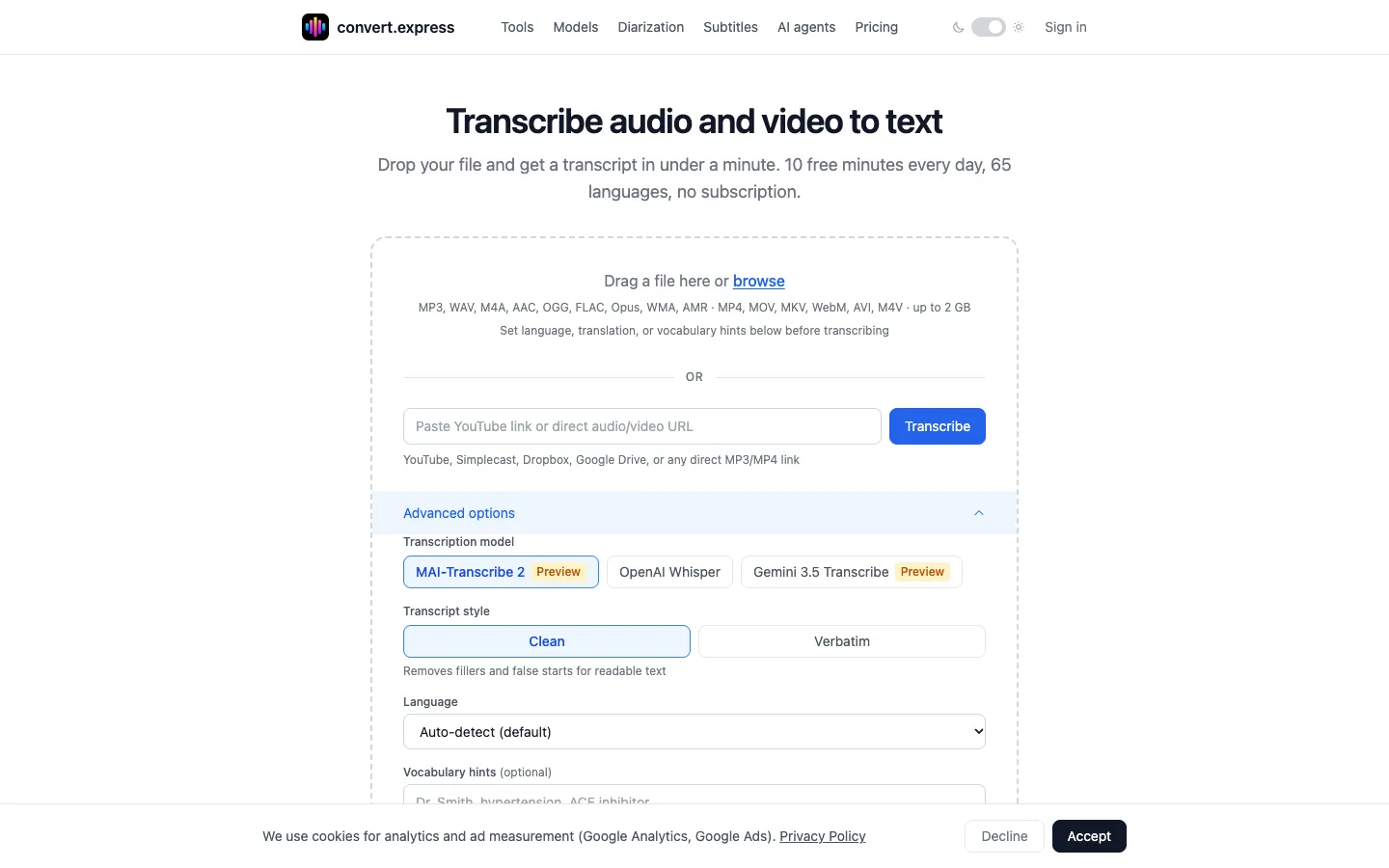
convert.express is a web transcription service that charges by the minute instead of by the month. You upload an audio or video file of up to 2 GB, or paste a YouTube, Simplecast, Dropbox, Google Drive or direct MP3/MP4 link, and pick one of three models: Microsoft MAI-Transcribe 2 (the default), OpenAI Whisper or Google Gemini 3.5 Transcribe. It detects the language automatically across 65 languages and returns the transcript as TXT, PDF, SRT or VTT, with optional speaker labels.
The first 10 minutes each day are free and need no credit card or account. After that every model costs the same €0.02 per minute, so a 30-minute interview comes to €0.60. From a finished job you can ask for a short summary, an action list or a translation into 103 languages at no extra charge, and translated subtitles keep their original timecodes. Files and transcripts are deleted within 24 hours and aren't used to train AI models. An MCP server, a standard connector that plugs outside tools into AI assistants, means Claude, ChatGPT, Codex or Cursor can run transcriptions for you without an API key.
It's aimed at people who transcribe now and then, such as freelance journalists, students, researchers and podcasters. The founder, Alexey Babkin, says heavy daily users and teams are better served by a subscription tool. It launched publicly in mid-2026.
Features
Three transcription models: Microsoft MAI-Transcribe 2 (the default, in public preview, 60 languages), OpenAI Whisper (generally available, 57 languages) and Google Gemini 3.5 Transcribe (in public preview, 61 languages), all at the same price.
Files or links: Accepts MP3, WAV, M4A, AAC, OGG, FLAC, Opus, WMA, AMR, MP4, MOV, MKV, WebM, AVI and M4V files up to 2 GB, or a YouTube, Simplecast, Dropbox, Google Drive or direct MP3/MP4 link. Long recordings are split and joined back together automatically, with no separate length limit.
Automatic language detection: Covers 65 languages in total and detects the language for you, with an option to set it by hand.
Speaker labels: An optional step on all three models that works out who is speaking (using pyannote Precision-3) and labels them "Speaker A", "Speaker B" and so on. You can't rename speakers across jobs.
Four export formats: TXT, PDF, SRT and VTT from the same job, or all of them in one ZIP. SRT and VTT are the standard subtitle file formats.
Vocabulary hints: Up to 500 characters of names and terms to help with proper nouns. MAI-Transcribe 2 uses them as a phrase list and Whisper as a prompt; Gemini doesn't use them.
Clean or word-for-word text: On MAI-Transcribe 2, choose readable text with filler words removed or a word-for-word transcript. MAI-Transcribe 2 also gives a timestamp for every word.
Summaries, action lists and translation: After transcription, generate a 3 to 5 sentence summary, a numbered action list, or a translation into any of 103 languages, all run on Anthropic Claude. Translated SRT and VTT files keep the original timecodes. Whisper can also translate to English in one pass when you upload.
Connector for AI assistants: Add https://convert.express/mcp to Claude, ChatGPT, Codex, Cursor or VS Code, then ask in plain words to transcribe, summarize, translate, share or delete jobs, with no account or API key.
Batch uploads and share links: Upload several files at once, each as its own job, and send a read-only share link that works until the job expires.
24-hour auto-delete: Audio and transcripts are deleted within 24 hours, or right away on request, and are never used to train models.
Free subtitle tools: SRT to TXT, VTT to SRT, SRT to VTT and a timestamp shifter run inside your browser, so the file is never uploaded.
Pricing
You pay only for the minutes of audio or video you transcribe, either by card for each file or from a prepaid balance you top up. There's no monthly plan.
Free quota: 10 minutes of transcription a day with no credit card, resetting at midnight UTC. Without an account the quota is tied to a browser cookie; a free account keeps it across sessions and adds transcript history. Files longer than the quota show a preview until you pay.
Pay as you go: €0.02 per minute beyond the free quota, the same on all three models. There's no subscription, seat licence or monthly minimum. The site's examples: a 30-minute interview is €0.60, a 60-minute file €1.20 and a 90-minute lecture €1.80. Unused free minutes come off your first file, so a 60-minute file then costs €1.00.
Minimum charges: A single card payment has a €0.50 minimum. Paying from a prepaid balance, with top-ups from €5, has no minimum. AI assistants that pay on their own have a €0.50 minimum by shared card or €0.10 minimum in USDC, a digital dollar, on the Tempo network.
Included at no extra cost: Speaker labels, summaries, action lists, translation into 103 languages and Whisper's translation to English at upload are all covered by the per-minute price.
AI assistant spending: An assistant signed in to your account can pay from your prepaid balance up to a daily limit you set, starting at €5 a day.
Team or Enterprise plans: None. The site says there's no team plan or seat management.
Integrations
Platforms: Web browser, plus the MCP connector and a plain transcript link for AI assistants. There's no desktop or mobile app, and no public API with keys; the site says the MCP server is its only machine interface.
YouTube, Simplecast, Dropbox and Google Drive: Paste a public link and convert.express fetches the audio or video itself.
Claude, ChatGPT, Codex, Cursor and VS Code: Connect through the MCP server at https://convert.express/mcp without signing in, or https://convert.express/mcp/account when signed in, so jobs land in your dashboard. In ChatGPT, custom MCP apps need developer mode.
Any assistant that can open a web page: https://convert.express/transcript?url=... returns the transcript of a YouTube video, Simplecast episode or audio file as plain text, or as SRT or VTT by adding &format=srt or &format=vtt.
Stripe and USDC on Tempo: Card payments go through Stripe. Assistants with a Machine Payments Protocol wallet can pay with a shared Stripe card token or USDC.
Platforms
- Web
- MCP connector for AI assistants
- transcript link for AI assistants
What users love about convert.express
Paying only for what you transcribe: Occasional users on Trustpilot say the pay-as-you-go pricing and free daily allowance meant they could try it before spending anything and skip another monthly subscription.
Quick, no-setup workflow: Trustpilot reviewers describe a clean interface where you upload a file, pick options and get a transcript without a complicated setup, and say it works fast.
Extras without upsells: Reviewers point out that subtitles, translation, speaker labels and summaries come with the transcript at no extra cost.
Frequently asked questions about convert.express
How do I transcribe audio to text for free?▼
Upload the file or paste a link on convert.express and press Transcribe. The first 10 minutes each day are free, with no credit card or account needed, and the quota resets at midnight UTC. Longer recordings show a preview, and the rest costs €0.02 per minute. A free account keeps your daily quota and transcript history across sessions.
How much does AI transcription cost?▼
On convert.express it costs €0.02 per minute of audio or video after the 10 free daily minutes, whichever of the three models you pick. A 30-minute interview is €0.60 and a 90-minute lecture €1.80. There's no subscription. A single card payment has a €0.50 minimum, and a prepaid balance, topped up from €5, has none. Speaker labels, summaries and translation don't cost extra.
Can I transcribe a YouTube video?▼
Yes. Paste the YouTube link into the URL field and convert.express fetches the audio and transcribes it, with no video download or browser extension. You get a preview straight away and can download the transcript as TXT, PDF, SRT or VTT. The same per-minute price and 10 free daily minutes apply.
How do I transcribe audio from a video?▼
Upload the video file directly. convert.express pulls out the audio track itself, so you don't need to convert it to MP3 first. It accepts MP4, MOV, MKV, WebM, AVI and M4V files up to 2 GB. For subtitles, download the SRT or VTT file, which can also be translated into 103 languages with the original timecodes kept.
Can Claude or ChatGPT transcribe audio to text?▼
They can through convert.express's MCP server. Add https://convert.express/mcp to Claude, ChatGPT, Codex, Cursor or another assistant that supports MCP connectors and ask in plain words, for example "transcribe this and list the action items". No account or API key is needed. Assistants get some free use each day, then show a payment link at the same €0.02 per minute. In ChatGPT, custom MCP apps need developer mode.
Similar tools
Alternative AI options