
Recto
A free desktop canvas where the coding agents already on your computer, such as Claude Code, Codex, Cursor, OpenCode and Grok Build, build UI, motion, SVG and 3D designs in real HTML and CSS, which you can then edit by hand, comment on or send back to the agent.
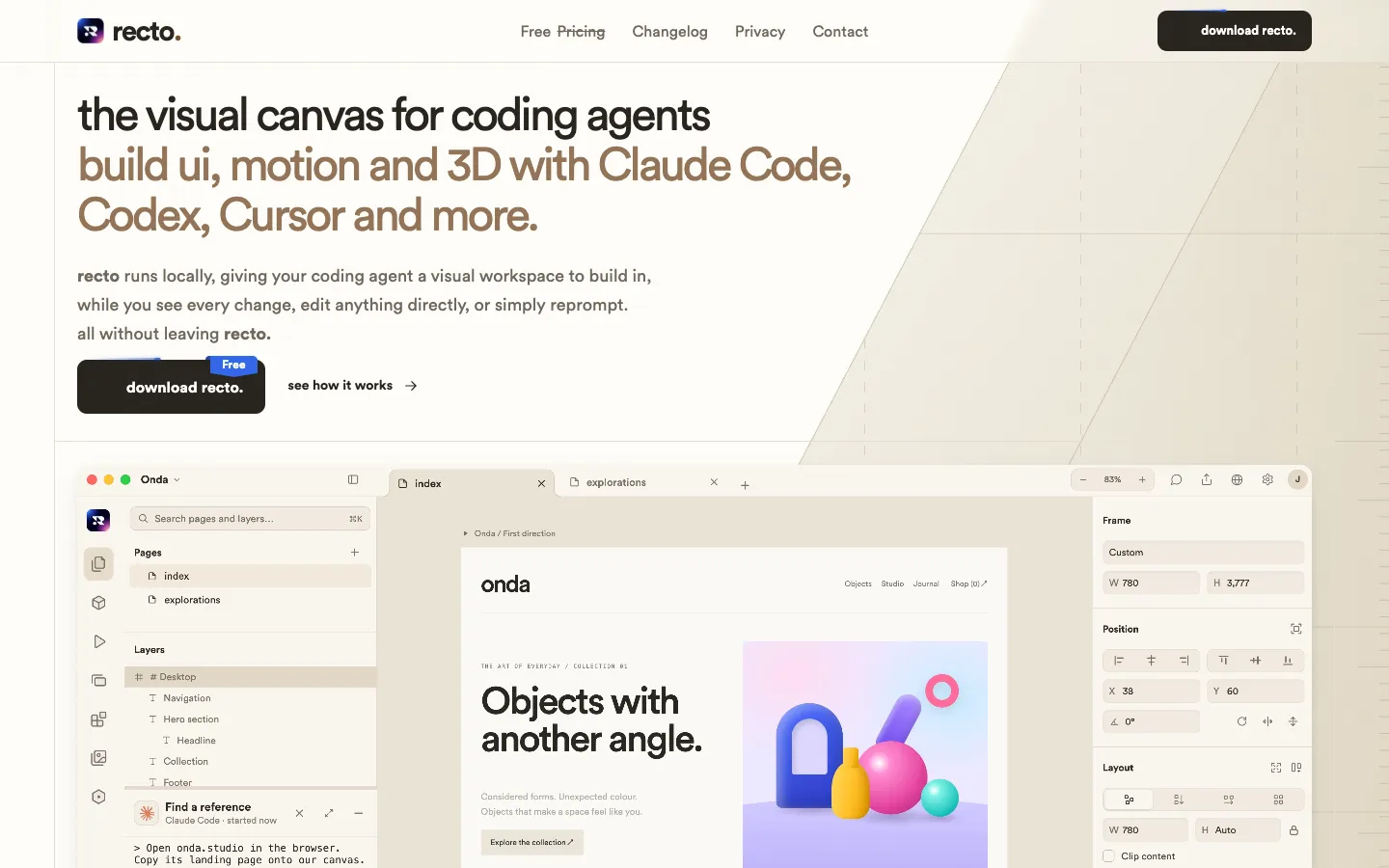
Short description
Recto is a free desktop app for Mac, Windows and Linux that gives coding agents somewhere visual to work. Normally, designing with an agent means switching between a terminal, a browser preview and screenshots. In Recto you pick one of the agents it finds on your computer (Claude Code, Codex, Cursor, OpenCode, and xAI's Grok Build since a later update), describe what you want, and watch the design appear on the canvas as it's built. After that you can drag, resize, restyle and animate elements yourself, select a part and ask the agent to change it, or pin a comment to an element and send it to the agent.
Each design is an HTML file with CSS underneath, so you can export it and use it anywhere. Every project has its own design system, kept in a DESIGN.md file and a theme.css file of tokens (shared values for colours, fonts and spacing), and the agent reads it before designing. Recto also handles motion timelines, vector graphics and 3D scenes, and it can import a web page from a URL as editable HTML.
Everything runs locally. Projects are folders on your own disk, and you don't have to set up MCP (a standard way of connecting AI apps to outside tools) or any API keys to link Recto to your agent. Recto was built by co-founders Maroof and Alam. Their first Show HN post went up on October 29, 2026, and version 0.1.9 came out on November 9, 2026. Where the company is based isn't published.
Features
Uses the agents you already have: Recto detects Claude Code, Codex, Cursor and OpenCode on your computer and runs them inside the app, and Grok Build was added later. Several agents can work on the same design, and on a new computer you can install agents from Recto without a terminal or Homebrew.
Live canvas on real HTML: Your design is an HTML file that Recto watches and redraws the moment it changes. Each edit changes only the part of the file it's meant to.
Direct editing: Select, move and resize elements, use auto layout that writes real flex and grid CSS, and double-click any text to rewrite it. Frames come in widths you choose, and each frame shows how the page responds at that width.
Select and reprompt: Pick part of the design and ask the agent to take it further, as many times as you like.
Comments for your agent: Pin a comment to any element with text, an image or a drawing, and send it to the agent along with the element you selected. The agent reads it and replies.
Design systems: Each project gets a DESIGN.md and theme.css tokens for colours, type, spacing and components. Six systems are included (Ledger, Grid, Loom, Kiln, Signal and Riot), or you can capture one from a website. Components can have variants and linked copies.
Motion, SVG and 3D: Timelines with keyframes, video, images, audio and 3D clips that export to video; pen, pencil, shapes, booleans, gradients and masks, exported as SVG or PNG at 1x, 2x or 3x; and 3D scenes with Blender-style navigation that export as .glb files.
Web import and built-in browser: Import a page from a URL as editable HTML, or pick part of a site in the built-in browser and copy it to the canvas with its pictures, fonts, motion and hover states. Your agent can browse alongside you, and it asks before anything that buys, sends or deletes.
Unlimited frames: Keep every version of an idea side by side on one canvas.
Share links: Sign in with Google, GitHub or email to share a page, canvas, deck, 3D scene or animation as a link that opens in any browser. You can open it to anyone with the link or only to people you invite by email, and their comments come back into Recto.
Export: Take the HTML and CSS wherever you want. A Copy instructions option hands your agent an animation or 3D model to build into your own app.
Zen mode and command bar: Zen mode leaves only your design and your agent on screen, and Cmd+K jumps to any page, frame, layer, tab or command.
Pricing
Recto: Free. The site lists the price as "Free", and no paid plans are published.
Updates: Every update since version 0.1.0 has been free, and Recto installs them when you quit.
Coding agents: Not included. Recto uses the agents you already have installed, and each one runs on its own provider's account and terms. Recto doesn't publish what those cost.
Integrations
Coding agents: Claude Code, Codex, Cursor, OpenCode and Grok Build are detected automatically and run inside Recto without MCP or API setup.
Figma: You can paste from Figma onto the canvas. Pictures in a Figma paste need a Figma personal access token, a password-like code you create in your Figma account. Full Figma import is listed as coming soon.
Google Fonts: The font list refreshes each time Recto opens, and fonts you add are saved in the project.
Browser sign-ins: Sign-ins from Chrome, Edge or Firefox can be copied into Recto's built-in browser, and they stay on your computer.
Website embeds: Shared work can go on your own website with one line of code.
Export formats: HTML and CSS, video, SVG, PNG and .glb.
Platforms
- macOS
- Windows
- Linux
Frequently asked questions about Recto
Can Claude Code design websites and UI?▼
Claude Code can write the HTML and CSS for a website, and Recto gives it a visual canvas to work on. You choose Claude Code inside Recto, describe the page and watch it being built. Then you can move, resize and restyle elements yourself, or select a part and ask for changes. Recto works the same way with Codex, Cursor, OpenCode and Grok Build.
How do I design UI with Claude Code?▼
Install Recto, and it will detect Claude Code if it's already on your computer. Describe what you want and the design appears on the canvas as it's written. From there you can edit it directly or pin a comment to an element and send it to the agent. Each project has a DESIGN.md and theme.css tokens that the agent reads first, which keeps pages consistent.
Is there a Claude Design alternative that works with Codex?▼
Recto works with Codex as well as Claude Code, Cursor, OpenCode and Grok Build, and you can have several agents on one design. It's a free desktop app for Mac, Windows and Linux, and your designs are saved as HTML and CSS files in a folder on your computer.
Is Recto free?▼
Yes. Recto is a free download for Mac, Windows and Linux, and updates are free as well. You need your own coding agent, which runs under its provider's terms.
Does Recto generate real code?▼
Yes. Every Recto design is built on HTML and CSS, so you can export it and use it outside the app. Auto layout writes real flex and grid CSS, and each frame shows the page at the width you set.
Similar tools
Alternative AI options