Retake
A free, open-source tool that your coding agent, such as Claude Code, Codex or Cursor, uses to record product walkthroughs of your web app in a real browser, saving the steps in a YAML file so the video can be recorded again when the app changes.
Short description
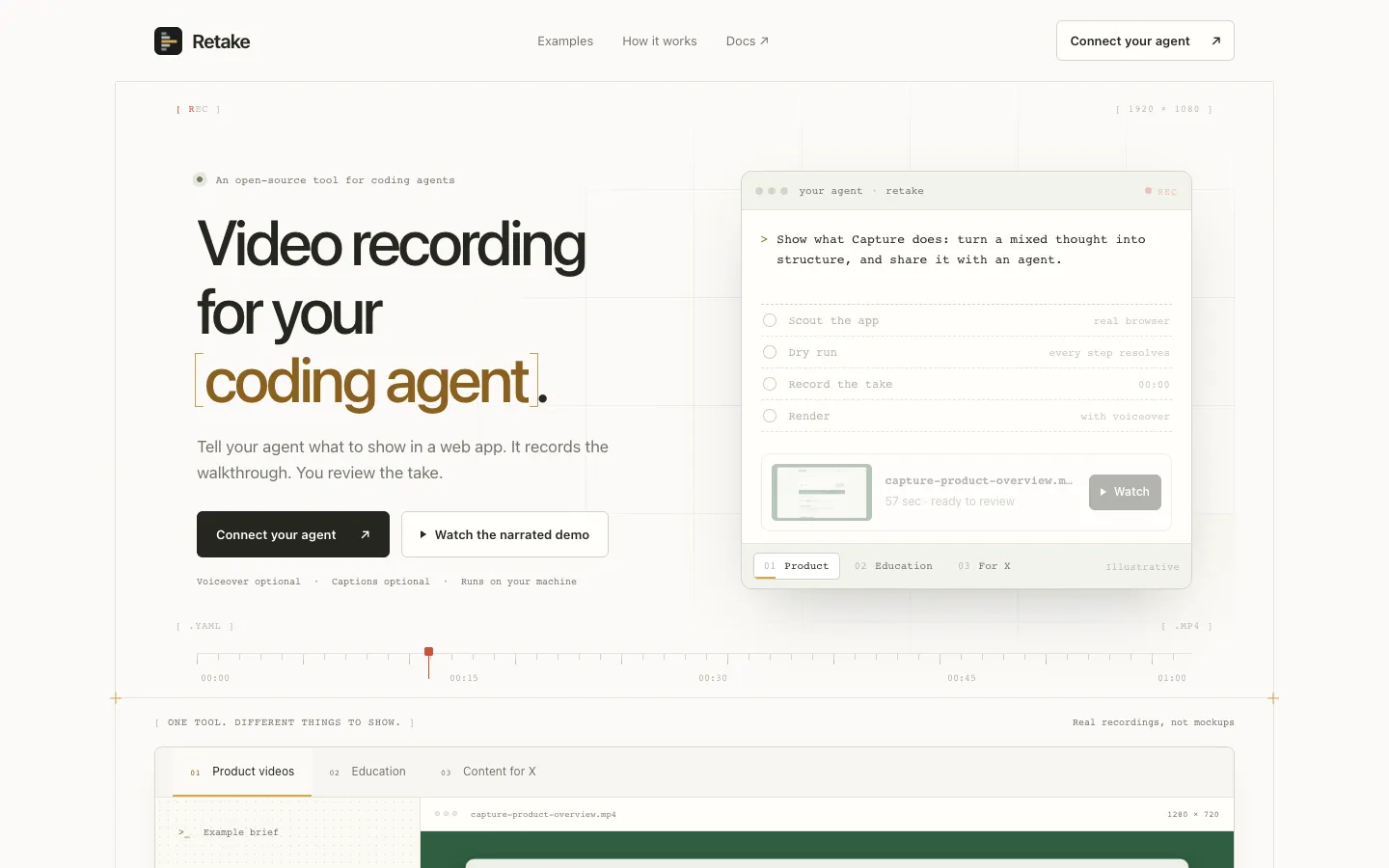
Retake records product demo videos of web apps, with your coding agent doing the work. You tell the agent which app to open and what to show. It looks at the real page, writes the clicks, typing and waits into a YAML file (a plain text list of steps), and checks every step in a dry run without recording. Retake then plays the steps in a real Chromium browser through Playwright, a browser automation tool, and records the take. You get an MP4 with optional captions and voiceover burned in, a still image of each scene and a proof log of what happened at every step.
The steps stay in your project. When the interface changes, the agent edits them and records again, and changes to captions, voice, speed or format re-render the saved take in seconds without opening the browser. The footage is a real recording of your app. Retake also gives agents ways to check the result: looking at frames, asking a vision model (an AI that reads images) whether each scene shows what it should, and sweeping every frame for clipped text, overlaps or broken images.
It suits developers and founders who make product videos, tutorials, GIFs for docs or posts for X. Retake is free and MIT-licensed open source, runs on your own computer and needs no Retake account. Gleb Bogachev built it. The repo was created in August 2026, and it launched on Peerlist in early November 2026.
Features
Recording run by your agent: The agent explores the app, drafts a list of clicks, typing, menu choices and waits, then records it in a real Chromium browser. It does this through an MCP server with about 39 tools. MCP is a standard way for AI agents to use outside tools.
Demos saved as files: Each walkthrough is a YAML file in a demos folder, with a URL, setup steps, scenes, captions and callouts, so you can edit and rerun it.
Dry run before recording: retake dry checks that every button, field and wait can be found without recording. A failed step saves a full-page screenshot and the text on screen.
Changes without re-recording: Captions, camera zoom, speed, trim and format are applied at render time, so a landscape take can become a 9:16 vertical cut in seconds.
Seven output presets: From draft (960x540) to post-landscape (1920x1080, the default), post-square (1080x1080), post-vertical (1080x1920), docs-gif (1440x900) and master.
Optional voiceover and captions: Videos are silent by default. Narration can use edge-tts or the local Kokoro and Aiden voices that run on Apple Silicon Macs, and you can add background music you supply.
Launch mode: Title cards, an intro and outro, music and a generated cover image for launch videos.
Visual checks for agents: look returns frames from each scene, verify has a vision model answer yes or no questions about each scene, sweep checks every frame for ten kinds of visual defect, and sense checks whether what was typed in and what came out add up.
Flag and confirm fixes: Confirmed defects are flagged, and fixed cuts the few seconds of a new take that show whether each one was fixed.
Logins kept from the agent: Demo-account logins are saved once per site in the macOS Keychain, or the system keyring on Linux. It supports authenticator app codes, and you can sign in by hand for SSO (company single sign-on) or SMS codes.
Routines and scheduling: Saved defaults for format, captions, voice and music per product, batch recording, and scheduled runs (launchd on Mac, cron on Linux) that deliver a video only if it matches a reference "north star" take.
Local review window: Play takes, change speed, pick the poster frame, and open stills, proof logs and step files at localhost:4310 in your browser.
Pricing
Free and open source: MIT license, no paid plans, and no Retake account or Retake API key needed. Recording runs on your own computer.
Third-party costs: The AI provider behind your coding agent, and any optional narration service or vision model you set up, may charge separately.
Integrations
Platforms: A CLI installed from npm that needs Node.js 20 or newer. The maker uses it daily on macOS and tests it on Apple Silicon Macs. Linux is tested only in automated checks. Windows isn't mentioned, and the research doesn't mention a mobile app. The review window opens in your web browser on your own computer.
Claude Code: retake install registers the MCP server for your user account and installs Retake's recording skill. This is the only setup the maker says is tested end to end.
OpenAI Codex: retake agent prints a settings block to paste into Codex's config.toml file.
Cursor: retake agent prints settings to paste into Cursor's mcp.json file.
Other MCP agents: Any agent that supports MCP can use the generated command and settings, though the maker hasn't verified them.
Playwright and Chromium: Drives Chromium through Playwright. Chromium downloads on first setup, and ffmpeg, the video conversion tool, comes bundled.
Optional AI providers: A few features (retake describe, retake ideas and the visual checks) can use the Claude Code or Codex command-line tools you're signed into, Groq or Mistral API keys, or a local OpenAI-compatible server such as Ollama or LM Studio.
Platforms
- CLI on macOS and Linux
- MCP server for coding agents
- review window in your browser
Frequently asked questions about Retake
Can Claude Code record videos?▼
Not by itself, but with Retake connected it can record videos of web apps. retake install registers Retake's MCP tools and recording skill with Claude Code. After a restart, you give the agent an app URL and one thing to show. It writes the steps, dry-runs them and records a real Chromium browser, producing an MP4, scene stills and a proof log.
How do I make a product demo video with AI?▼
With Retake, your coding agent plans and runs the walkthrough while the footage comes from your real app. Ask for a silent preview first, watch it in the local review window, then add captions or voiceover once you approve the take. The steps are saved as a YAML file, so when your app's interface changes the agent updates them and records again.
Can Playwright record video as an MP4?▼
Retake is built on Playwright and outputs MP4 directly: demo.mp4 with captions burned in, plus an optional high-quality master.mp4. It also fixes Playwright's slightly stretched pixels, adds cursor movement, and offers presets from 960x540 drafts to 1080x1920 vertical cuts. Format changes re-render the saved take without recording again.
Is there a free AI product demo video generator?▼
Retake is free and MIT-licensed, with no account or Retake API key, and recording runs on your own computer. You need Node.js 20 or newer and a coding agent or the CLI. Your agent's AI provider and any optional narration or vision services may have their own costs.
How do I record a browser walkthrough with a voiceover?▼
In Retake, voiceover is optional and off by default. Record and approve a silent take, approve a narration script, then re-render the same take with voice: edge-tts by default, or the local Kokoro and Aiden voices on Apple Silicon. Retake records one browser tab only, so it can't record your desktop or a phone screen.
Similar tools
Alternative AI options