Umless
A free, open-source dictation app for Mac, Windows and Linux that runs on your own computer: you hold a key and talk, and it types a tidied version of what you meant, with fillers and "no wait" corrections removed and the tone matched to the app you're in.
Short description
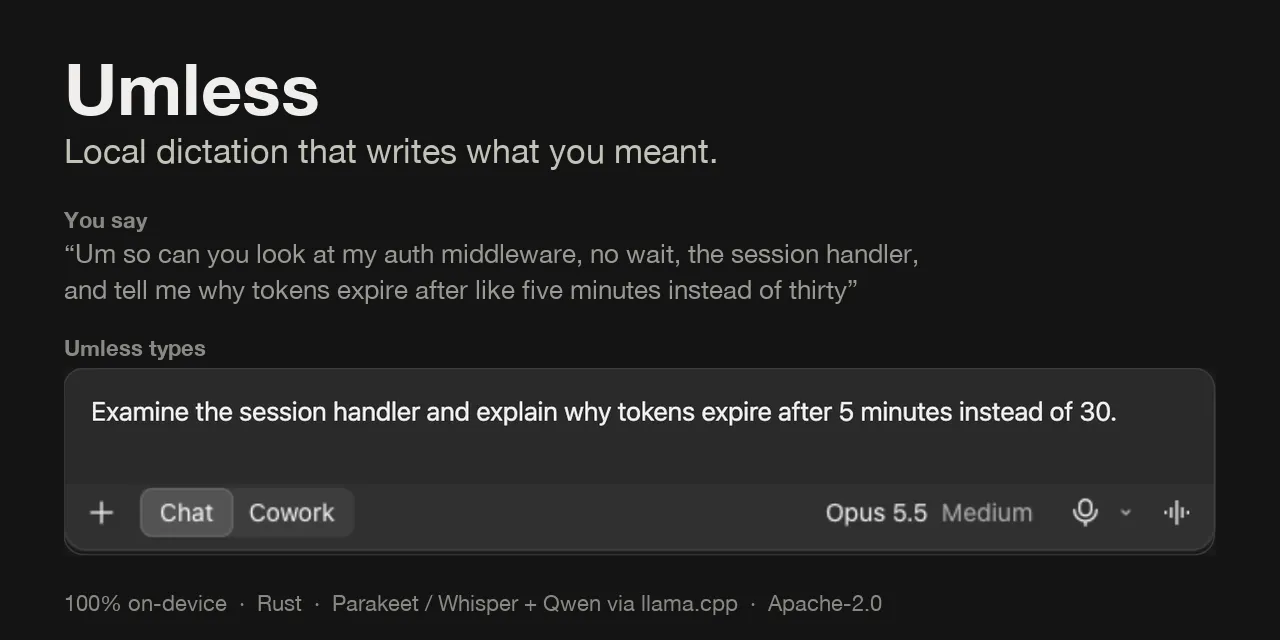
Umless is a hold-to-talk dictation app. Hold a key (Fn on a Mac, Ctrl + Win on Windows, Ctrl + Super on Linux), talk the way you normally would, let go, and the text is pasted at your cursor. Before it's typed, Umless strips fillers and stammers, works out self-corrections like "Tuesday, no wait, Wednesday" and turns spoken numbers into digits. A small language model then rewrites it for wherever you're typing: a short prompt in Claude, ChatGPT or Cursor, formal sentences in Gmail or Outlook, a casual message in Slack or WhatsApp.
All of this happens on your machine. Speech recognition uses Parakeet or Whisper, and cleanup uses Qwen models, one of them a 0.8B model the author fine-tuned and published. There's no account, no analytics and no network traffic while you dictate. On a Mac it also reads the text around your cursor, so it spells names from the thread correctly and picks up the conversation's tone. If the rewrite adds a name or number you never said, Umless throws it away and types the simpler rules-only version.
You choose one of three tiers: Lite (English only, 678 MB), Standard (25 European languages) or Max (99 languages, including Hindi). The README publishes accuracy and speed figures for each. Jatin Bishla, a software engineer, started the repo on November 2, 2026 and posted it to Hacker News on November 10. It's Apache-2.0 licensed, and you install it by building from source.
Features
Hold-to-talk in any app: Hold Fn on a Mac (Ctrl + Win on Windows, Ctrl + Super on Linux), speak and release, and the text is pasted at your cursor. Your clipboard is put back afterwards, and pressing another key while holding cancels, so Fn shortcuts still work.
Filler and correction cleanup: On every tier, rules remove fillers and stammers, resolve self-corrections ("at ten. Actually, make it eleven"), write spoken numbers as digits ($18,750, 15%, 2:30) and add the question marks small models tend to drop.
A writing style for each app: The app you're in, or the site in your browser's window title, sets the style. You get a structured prompt in Claude, ChatGPT, Codex, Cursor or a terminal, formal text in Mail, Gmail, Outlook and Teams, casual text in Slack, WhatsApp and Messages, and plain cleanup everywhere else. A jokey chat can switch it to casual.
Name spelling from the screen (macOS): While you speak, Umless reads the text near your cursor through macOS Accessibility, so "pria" comes out as Priya if Priya is in the thread. That text stays on your Mac and isn't saved.
Command mode: Hold Fn + Control and say what you want written, such as "reply saying thanks, I'll send it Thursday" in a Gmail thread. With text selected, it rewrites the selection ("make this more polite", "turn this into bullet points").
Check against made-up facts: Each rewrite is compared with what you said. If it adds or drops a name or number, or answers your words instead of tidying them, Umless types the rules-only text instead.
Three model tiers: Lite pairs Parakeet-TDT 110M with the fine-tuned Umless-Lite-0.8B (678 MB, English, 5.7% word error rate, about 355 ms after you let go). Standard uses Parakeet-TDT 0.6B v3 with Qwen3.5-2B (1951 MB, 25 European languages, 3.6%, 760 ms). Max uses Whisper large-v3-turbo with Qwen3-4B (3533 MB, 99 languages including Hindi, 1.8%, 1250 ms). Times were measured on an M5 MacBook Air.
Personal dictionary that learns: Add names and terms one per line, plus "heard as" entries such as "Gaurav = Gorov, Barraf". On a Mac, if you correct a name Umless typed, it adds your spelling for next time.
History and settings window: The menu bar app shows past dictations, lets you edit the dictionary or change one app's style, and can launch at login.
Command line tool: The umless command can listen, transcribe a file, clean up any text, run command mode, list microphones, download models and run benchmarks without the app.
Benchmarks you can rerun: umless bench plays recordings through every installed tier and reports accuracy, speed, CPU use and size. The README lists results on 11 synthetic clips and on the author's own voice.
Open fine-tuned model: The Lite cleanup model is a LoRA fine-tune of Qwen3.5-0.8B (a small add-on layer trained on top of the original model). The weights are on Hugging Face, and the training notebook runs on a free Colab T4.
Pricing
Free: Open source under Apache-2.0, including the fine-tuned model and its training pipeline. The repo mentions no account, paid plan or usage limit.
Model licences: The bundled models keep their own licences: Parakeet is CC-BY-4.0, Whisper is MIT and Qwen is Apache-2.0.
Disk space: Each tier needs about 1 to 6 GB free. The downloads are about 650 MB for Lite, 1.8 GB for Standard and 3.1 GB for Max.
Integrations
AI chat and coding apps: Writes short, structured prompts in Claude, ChatGPT, Codex, Cursor and terminals.
Email apps: Uses a formal style in Mail, Gmail, Outlook and Teams.
Messaging apps: Uses a casual style in Slack, WhatsApp and Messages.
Hugging Face: Models are downloaded once from Hugging Face and the sherpa-onnx GitHub releases. After that Umless doesn't go online.
GPU acceleration: Uses Metal on Apple silicon Macs. On Windows and Linux the language model runs on the processor by default, or on the graphics card if you build with Vulkan, CUDA or ROCm support.
Platforms
- macOS
- Windows
- Linux
- CLI
Frequently asked questions about Umless
Is Umless free?▼
Yes. Umless is open source under the Apache-2.0 licence, and that covers its fine-tuned cleanup model and training pipeline too. The repo mentions no account, paid plan or usage limit. The speech and language models it downloads have their own open licences (Parakeet CC-BY-4.0, Whisper MIT, Qwen Apache-2.0).
Does Umless work offline?▼
Yes, once it's set up. The models are downloaded once from Hugging Face and the sherpa-onnx GitHub releases. After that your audio, transcripts and the screen text it reads stay on your computer, and there's no account, analytics or network traffic while you dictate. On a Mac, your history and dictionary are plain files under ~/Library/Application Support/Umless.
How is Umless different from Wispr Flow?▼
According to the Umless README, Wispr Flow also cleans up speech and adapts to each app, but it processes your audio in the cloud and its full version is a paid subscription. Umless does the cleanup and per-app writing on your machine with open models you can inspect, swap or fine-tune, and it publishes its benchmarks. Compared with the dictation built into macOS, Umless removes fillers and false starts, where macOS types them as spoken.
Does Umless work on Windows and Linux?▼
Yes. On Windows 10 or 11 and on Linux with X11 or Wayland (tested on Ubuntu 24.04), all three tiers work, along with typing at the cursor and per-app styles. The hold key is Ctrl + Win or Ctrl + Super. Reading on-screen text and learning from your corrections only work on macOS so far, and the repo says the Windows and Linux desktop app is newer and hasn't yet been tried on a real desktop. On GNOME Wayland, per-app styles fall back to plain cleanup.
How do I install Umless on a Mac?▼
There's no DMG or Homebrew package yet. You clone the GitHub repo and run ./install.sh, which installs Rust and cmake if they're missing, builds the app, downloads the tier you pick and puts Umless.app in Applications. You need macOS 13 or later on Apple silicon. On an M5 MacBook Air a fresh build took 71 to 94 seconds, and Standard's 1.77 GB of models took about four minutes to download on the author's connection.
Similar tools
Alternative AI options