Worktrunk
A free, open-source command-line tool that gives each AI coding agent its own Git worktree, so you can run several Claude Code or Codex sessions on one project at once and create, list, merge and clean them up with short wt commands.
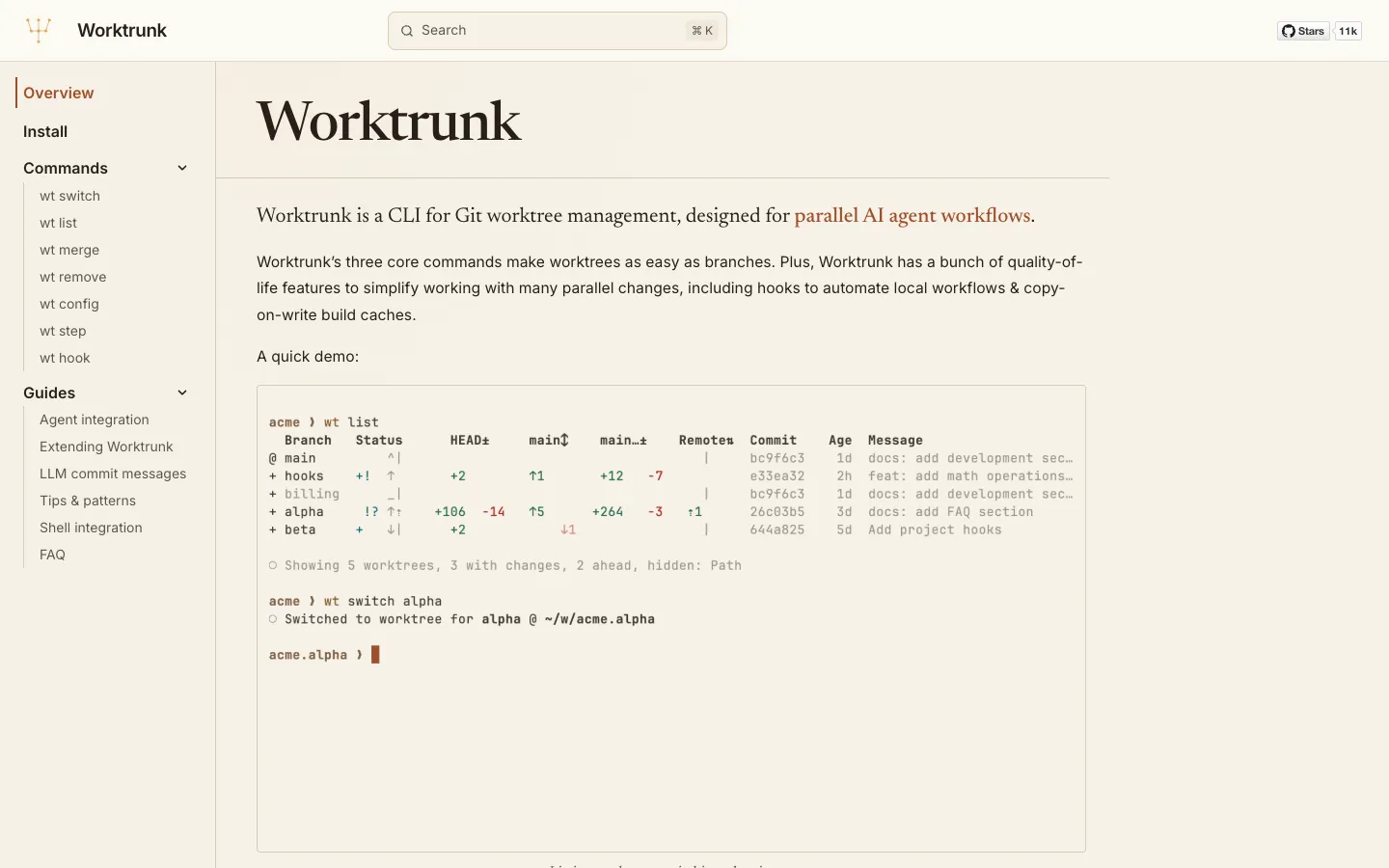
Short description
Worktrunk is a command-line tool, meaning you use it by typing commands in a terminal, for running several AI coding agents on the same project without them overwriting each other's work. It does this with Git worktrees. A worktree is an extra copy of your project folder that shares the same Git history but sits on its own branch, so each agent edits its own files. Git has had worktrees for years, but setting one up means typing the branch name three times and cleaning up by hand. Worktrunk turns that into one command: wt switch -c -x claude feat creates the branch and folder, moves you into it and starts Claude Code there.
It also adds a status view of every worktree with CI status (results of your automated build and tests) and pull request links, a single command that squashes, rebases, merges and cleans up, hooks that install dependencies or start dev servers in each new worktree, AI-written commit messages and shared build caches. Plugins for Claude Code, Codex, OpenCode, Pi, oh-my-pi and Gemini CLI show which agents are working and which are waiting.
It's for developers who already run coding agents in a terminal and want to run 5 to 10 of them in parallel. Maximilian Roos wrote it in Rust. It's dual-licensed under MIT or Apache-2.0, and its first release (0.1.0) came out on November 3, 2025.
Features
Worktrees by branch name: wt switch feat jumps to a branch's worktree, and wt switch -c feat creates the branch and worktree together. Folder paths come from a template you can change, by default ../<repo>.<branch>.
Start an agent in one command: The -x flag runs a program after switching, so wt switch -x claude -c feature-a -- 'Add user authentication' opens a new worktree and hands the task to Claude Code. It works the same way with Codex, OpenCode, Amp or any other command-line agent.
Status of every worktree: wt list shows each branch's staged changes, commits ahead of main, unpushed commits and age. wt list --full adds CI status, pull request links and optional AI-written branch summaries.
Interactive picker: Running wt switch with no arguments opens a picker with live previews of changes, logs, pull requests and CI status. wt switch pr:123 or mr:101 jumps straight to a GitHub pull request or GitLab merge request branch.
One-command merge and cleanup: wt merge squashes your commits into one, rebases onto the target branch, merges and removes the worktree and branch. wt remove cleans up after a pull request is merged and refuses to delete uncommitted work unless you add --force.
Hooks for setup and checks: 10 hook points, such as pre-start, post-start, pre-commit, pre-merge and post-remove, run project or personal commands like npm ci, tests or dev servers at those moments. Project hooks need your approval the first time they run.
AI commit messages: Sends your changes to any AI command you set up (Claude Code with Haiku, Codex, OpenCode, llm, aichat) to write commit messages during wt merge, wt step commit and wt step squash.
Shared build caches: wt step copy-ignored copies files Git ignores, such as .env, node_modules/ or target/, into new worktrees. On APFS, btrfs and XFS disks it uses copy-on-write, which shares the data until a file changes, so ten worktrees don't take ten times the disk space.
Agent activity markers: Plugins mark each worktree as working or waiting for input in wt list, and a Claude Code status line shows worktree status, model, context use and how fast you're using up your rate limit.
Claude Code extras: The Claude Code plugin sends Claude's own worktree handling through Worktrunk and adds a /wt-switch-create skill to start a task in a fresh worktree and a /wt-diff pane that shows what the session changed in each worktree.
A dev server per worktree: The hash_port template filter gives each worktree its own port, and the docs include recipes for databases, tmux sessions and Caddy subdomain routing.
Aliases and scripting: Make your own wt <name> commands, set variables per branch and get JSON output from wt list for scripts.
Pricing
Worktrunk is free open-source software. The only possible cost comes from the AI tool you connect for its optional AI features.
Free and open source: Dual-licensed under MIT or Apache-2.0, per the repo's LICENSE file. No paid plan, account or sign-up is published.
AI features use your own tools: Commit messages and branch summaries run through an AI command you configure, for example Claude Code or Codex, so any cost comes from that tool's plan and not from Worktrunk.
Integrations
Platforms: CLI on macOS, Linux and Windows. It works in the bash, zsh, fish and PowerShell shells and in Git Bash, with experimental Nushell support. There's no desktop app or graphical interface.
Claude Code: A plugin with a configuration skill, activity markers, worktree isolation hooks, /wt-switch-create, /wt-diff and a status line. Install it with wt config plugins claude install.
Codex: A plugin with a configuration skill and activity markers. Codex can also write commit messages.
OpenCode: A plugin with activity markers and, under OpenCode 2, a Worktrunk worktree strategy.
Pi and oh-my-pi: Extensions that add activity markers.
Gemini CLI: An extension installed from the GitHub repo, with a configuration skill and activity markers.
Git hosts: CI status and pull request checkout through the command-line tools for GitHub (gh), GitLab (glab), Gitea (tea) and Azure DevOps (az).
Terminals and dev tools: Documented recipes for tmux, Zellij, cmux, Caddy, direnv and mise.
Requirements: Git 2.43 or newer. On Windows you need Git for Windows, because hooks run in Git Bash.
Platforms
- CLI on macOS
- Linux and Windows
- plugins for Claude Code
- Codex
- OpenCode
- Pi
- oh-my-pi and Gemini CLI
What users love about Worktrunk
Worktrees finally feel as easy as branches: Developers on Hacker News, Reddit and their own blogs say they knew about worktrees but avoided them because juggling folders and branches was clumsy, and Worktrunk is what made them use worktrees for everything. One found it better than their editor's built-in worktree support.
Hooks set up each worktree for you: Users rely on the hooks to install dependencies, copy .env files, start containers and give every worktree its own port, so each copy starts clean and local tests just work.
Merge and cleanup in one step: People running several agents at once like that wt merge runs their tests and linters, merges the branch and removes the worktree, and they use it daily for squashing and merging.
Polished and carefully made: Among the many worktree managers appearing, users single out its UX and the care in the project, and one Reddit user called it the most professionally done of them.
What users complain about Worktrunk
Windows needs extra setup: Early Windows users, in GitHub issues, hit a name clash with Windows Terminal's own wt command, and shell integration wouldn't change folders in PowerShell or Git Bash. The Windows installer now installs it as git-wt to avoid the clash.
Some commands slow down at scale: Users reported pruning one worktree taking over 3 minutes, copying ignored files getting slower after an update, and tab completion offering thousands of remote branches in large repos. The maintainer has closed most of these reports.
No Jujutsu support: Developers who use Jujutsu (jj), a different version control tool, instead of plain Git have asked for workspace support, and the request is still open.
Frequently asked questions about Worktrunk
What is a git worktree?▼
A git worktree is an extra working folder for the same repository, checked out on a different branch and sharing one .git history. Each AI agent, or each task, can then edit its own files without touching the others. Plain Git makes you type the branch name three times to create one and clean it up by hand. Worktrunk finds worktrees by branch name, so wt switch -c feat creates one and wt remove deletes it.
How do I use git worktrees with Claude Code?▼
Install Worktrunk, for example with brew install worktrunk && wt config shell install, then run wt switch -c -x claude feat to create a worktree and start Claude Code inside it. Running wt config plugins claude install adds the Claude Code plugin, which shows working or waiting markers in wt list, sends Claude's own worktree handling through Worktrunk and adds /wt-switch-create and /wt-diff. When the work is done, wt merge merges the branch and removes the worktree.
Can I run multiple Claude Code sessions at once?▼
Yes, as long as each one has its own folder, otherwise their changes mix in one working directory. With Worktrunk you start one worktree per task, for example wt switch -x claude -c feature-a -- 'Add user authentication' and wt switch -x claude -c feature-b -- 'Fix the pagination bug'. wt list then shows every branch with its changes, CI status and whether its agent is working or waiting.
What does Worktrunk do that plain git worktree doesn't?▼
Plain git worktree creates and removes folders but leaves naming, setup, merging and cleanup to you, and git worktree list shows only folder paths. Worktrunk adds consistent folder names, hooks that install dependencies or start services in new worktrees, a status view across all worktrees with CI and pull request links, AI commit messages and a single wt merge that squashes, rebases, merges and cleans up. It runs plain git underneath and doesn't add global git hooks or edit ~/.gitconfig.
Does Worktrunk work on Windows?▼
Yes. Core commands, shell integration and tab completion work in Git Bash and PowerShell, and the interactive picker runs too. Install with winget install max-sixty.worktrunk. Because wt is already Windows Terminal's command, Winget installs it as git-wt. Git for Windows is required, since hooks run through Git Bash.
Similar tools
Alternative AI options