Inflect
A free, open-source English text-to-speech model you run on your own computer, with six preset voices, a 34M-parameter Mini model, eight sound tags like [laugh] and [sigh], and voice tuning from a 5 to 15 second recording.
Short description
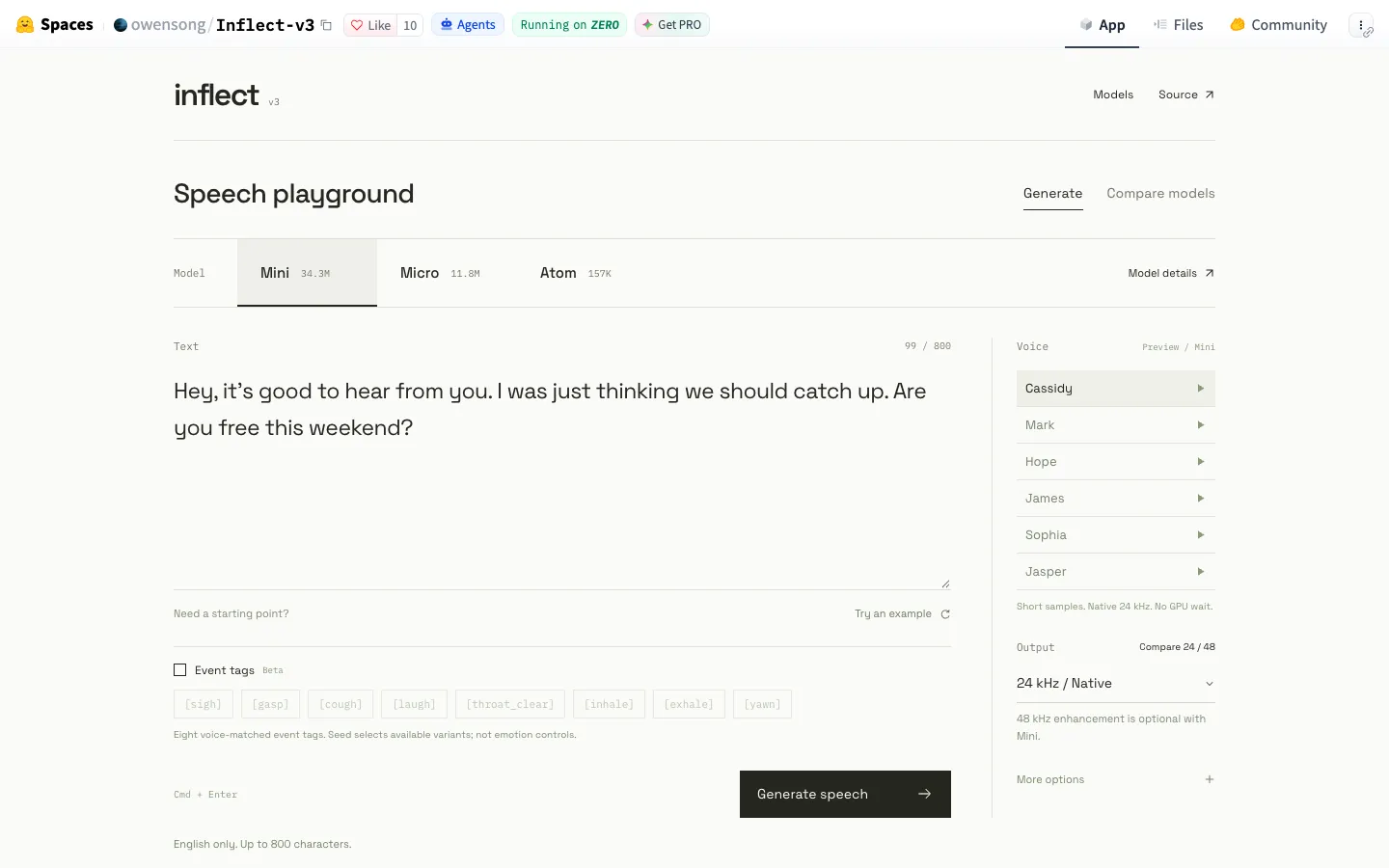
Inflect is a family of small English text-to-speech models made by independent developer Owen Song. Version 3 came out on November 11, 2026, in three sizes: Mini, Micro and Atom. Mini's speech core has 34.31 million parameters (the learned values that make up the model, a rough measure of its size), Micro has 11.79 million and Atom has 157.19 thousand. Every size has the same six voices, Cassidy, Mark, Hope, James, Sophia and Jasper, and writes 24 kHz WAV files.
To use it you download a full model package from Hugging Face, set up Python 3.12 on Windows or Linux and generate speech from the command line, on an ordinary CPU or an NVIDIA graphics card. Once it's set up, preset speech runs entirely on your machine and needs no online service. If you want to hear it first, a free browser playground on Hugging Face compares the three models side by side.
Mini has the extras. You can type tags such as [laugh], [sigh] or [gasp] to drop short sounds between sentences, build a reusable voice profile from a 5 to 15 second recording with the Voice Tuner, and switch on a small 2.85M-parameter enhancer for 48 kHz output. A separate toolkit helps you train Mini on another language.
The code and weights Owen Song owns are released under the Apache 2.0 license. Inflect is aimed at developers and hobbyists who want light, offline English voices for apps, narration or local assistants. Earlier versions came out in June (v1) and July 2026 (v2).
Features
Three model sizes: Mini has 34,310,790 core parameters in a 138.4 MB weight file, Micro has 11,787,634 and Atom has 157,190. The counts leave out the pronunciation component, the software it depends on and the optional add-ons, so they aren't download size or memory use.
Six preset voices: Cassidy, Mark, Hope, James, Sophia and Jasper come with every model size, and none of them needs a sample recording.
Runs on your own CPU or GPU: After the first download and setup, preset speech is generated on your machine. Mini also has a faster runtime for NVIDIA graphics cards using CUDA, NVIDIA's GPU computing platform.
Sound tags in Mini: Eight tags, [laugh], [sigh], [gasp], [cough], [yawn], [inhale], [exhale] and [clear_throat], work with all six voices. Each one inserts a short generated sound between bits of speech, runs on the CPU at 24 kHz and has only a few takes, so repeats sound alike. The words around a tag are spoken the same way as without it.
Voice Tuner in Mini: Builds a reusable voice profile from a 5 to 15 second recording you have permission to use and shifts the voice toward it. The developer says it won't produce an exact clone or a guaranteed accent match. Creating the profile is supported on Linux with a CPU and Python 3.12.
Optional 48 kHz output in Mini: A separate enhancer with 2,846,722 parameters writes 48 kHz audio. 24 kHz stays the default, and the developer suggests listening to both and picking by ear.
Long text in chunks: Long passages are split into smaller pieces before they're spoken. The developer doesn't claim streaming, where audio plays while it's still being generated.
Published test results: Mini got an average word error rate (how often a speech recognizer mishears the output) of 0.739% across all six voices on 1,688 test texts each, in the developer's own test. It scored 3.917 on UTMOSv2 and 4.479 on UTMOS22Strong, two automatic quality predictors. Speed tests ran 162.1 times faster than real time on an RTX 5090 graphics card and 1.81 times faster on a Ryzen 9 3900X CPU.
Toolkit for other languages: The Mini v3 adaptation toolkit checks sound coverage, prepares aligned recordings, fine-tunes the model, resumes from checkpoints and exports the result. English is the only language released so far.
Browser playground: A Hugging Face page lets you type text, switch voices, compare Mini, Micro and Atom and download what you make.
Pricing
Free and open source: The code and model weights Owen Song owns are under the Apache License 2.0. Third-party parts keep their own licenses.
Paid plans: None. There's no paid tier and no hosted API.
Playground: Free to use on Hugging Face.
Integrations
Hugging Face Hub: The Mini, Micro and Atom packages download with Hugging Face's hf command line tool, and each comes with a script that checks the download is complete.
PyTorch and NVIDIA CUDA: Runs on PyTorch on a CPU, with a separate install recipe and faster runtime for NVIDIA graphics cards.
Python command line: Makes WAV files with run.py on Mini or synthesize.py on Micro, where you set the voice, profile and output file.
Gradio playground: The online playground is a Gradio app (a Python tool for building simple web demos) running on Hugging Face's ZeroGPU hardware.
Platforms
- Windows
- Linux
- web playground
- Python command line
What users love about Inflect
Good sound for a tiny model: People who run AI models at home were surprised by how good it sounds at 34M parameters.
Holds up against Kokoro: A user who had tried several small models said it sounded better than standard Kokoro, and that the faint static most TTS models have was hard to hear.
An open license: Users were glad to see another Apache-licensed text-to-speech model and called it pretty good for what you get.
Frequently asked questions about Inflect
Is Inflect free for commercial use?▼
Yes, for the parts Owen Song owns. His code and model weights are under the Apache License 2.0, which allows commercial use, and the current licensing file says this replaces the earlier evaluation-only and noncommercial terms. Third-party parts keep their own licenses (the Voice Tuner's encoder exception is still CC BY-SA 3.0, for example), so read the notices in the package you download.
How do I run Inflect text to speech locally?▼
Make a fresh Python 3.12 environment on Windows or Linux, download the full model package from Hugging Face with the hf tool, run the verification script and install the CPU requirements. Then run a command like run.py speech with a voice such as cassidy, your text and an output file name. You get a 24 kHz WAV file. If you have an NVIDIA graphics card, there's a separate CUDA install for faster generation.
Can Inflect clone my voice?▼
Partly. Inflect Mini's Voice Tuner builds a reusable profile from a 5 to 15 second recording you're allowed to use and moves its voice toward it. The developer says how close it gets varies, and it isn't an exact clone or a guaranteed accent match. Making a profile is supported on Linux with a CPU, and Micro and Atom don't have the feature.
Can Inflect laugh or show emotion?▼
Mini can add eight sounds with tags: [laugh], [sigh], [gasp], [cough], [yawn], [inhale], [exhale] and [clear_throat], on all six voices. You type the tag where you want the sound. The tags don't change the tone of the words around them, and there are no angry, happy or whisper settings.
What languages does Inflect support?▼
Only English so far. Mini comes with a toolkit for training it on another language, though the developer notes that a successful test run doesn't prove the new language will sound good.
Similar tools
Alternative AI options