Aula
A free, open-source desktop study app that turns your notes, slides and past exams, or just a topic, into a course with lessons, auto-graded practice, flashcards and a mock exam, running on your own Claude or ChatGPT subscription, an API key or a free model on your computer.
Short description
Aula is a study app for macOS, Windows and Linux. You give it your class materials, such as PDFs, Word and PowerPoint files, spreadsheets, EPUBs, web pages, links, pasted text or photos of notes, or just a line like "Statistics for psychology, final in May". It builds a course from that: short lessons, exercises that are checked as you answer them, flashcards and a timed mock exam shaped like your real one. Then it spreads the work over the days left before your exam.
A team of AI agents builds each course, and you can watch them work. One agent re-solves every checkable exercise without looking at the answer key, and another settles any disagreement. Most of your answers are graded by Aula's own math and chemistry engine instead of the AI. Aula can also read your files and deadlines from Canvas, Moodle, Blackboard, Google Classroom, Microsoft Teams and other school platforms, without ever posting or submitting anything.
Aula doesn't sell AI access. It works with a Claude or ChatGPT subscription you already have, an API key from a provider such as Anthropic, OpenAI or Google Gemini, or a free model that runs on your own computer. Your courses and progress stay on your machine, with no account and no tracking. Luum Labs makes it, releases it under the AGPL-3.0 open-source license, and launched it in early access on October 28, 2026.
Features
Courses from your files or a topic: Builds a course from PDF, Word, PowerPoint, Excel, EPUB, web pages, Markdown, text and code files, links, pasted text, or photos of notes and whiteboards, which it reads with text recognition (OCR). Courses come in three sizes: Quick, Standard and In depth.
Agent team that checks answers: Separate AI agents read your materials, plan the course with topics weighted by what the exam asks, write lessons in parallel, re-solve checkable exercises without the answer key, and fix the key when they disagree. If a course hits your AI plan's usage limit, Aula saves it so you can resume later.
Interactive lessons: Step-by-step, free-explore or read-only modes, with math and chemistry notation, graphs with sliders, labeled diagrams, 3D molecules, simulations, maps, flowcharts and slides. Lessons can be read aloud.
Auto-graded practice: 16 answer types, from multiple choice and equations to labeling a figure or balancing a chemical reaction. Aula's own engine grades most of them without calling the AI. Open answers are graded against a rubric, and questions you miss come back after 1, 3, 7, 16 and 35 days.
Flashcards and mock exams: Flashcards use FSRS spaced repetition, a method that shows each card again just before you're likely to forget it. Timed mock exams copy your real exam's sections, points and difficulty and end with a report by topic.
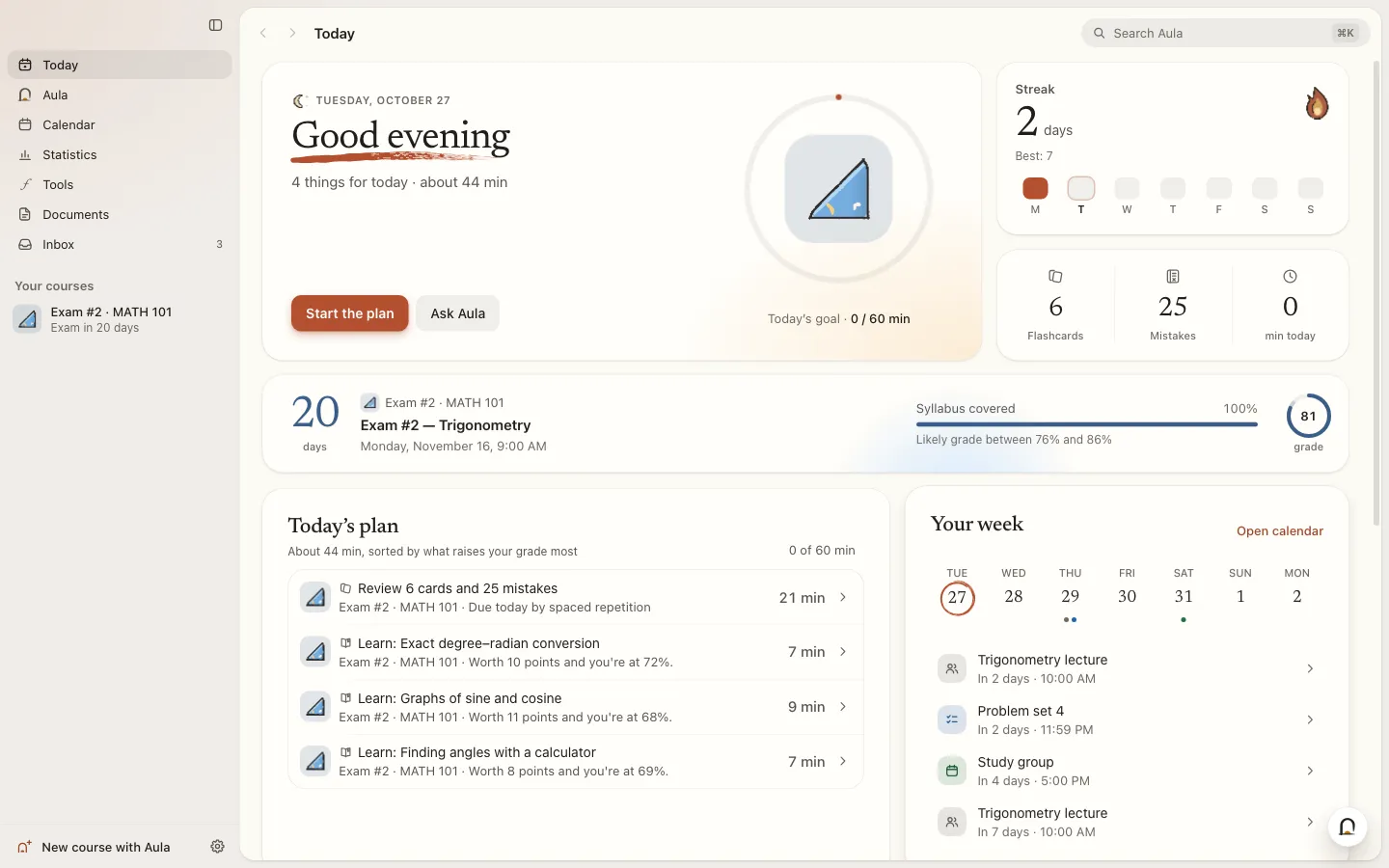
Study plan and calendar: A Today screen lists everything due across your courses, ordered by what should raise your estimated grade the most. The calendar accepts events typed in plain words, .ics calendar files and calendar subscriptions, and has a "Prepare for this exam" button.
Chat and hint tutor: A chat that knows your courses and calendar, cites your own materials, and can add events or build courses once you approve. Every exercise also has a tutor that gives hints without giving away the answer.
School platform sync: Pulls files and due dates from Canvas, Moodle, Blackboard, Google Classroom, Brightspace, Schoology, Microsoft Teams, Sakai, itslearning, Open edX or any class website. It blocks submitting, posting, deleting or paying, and never types your password.
Printable documents: Turns a course into a study guide, summary, one-page cheat sheet, printable flashcards, practice exam or slides, as PDF, Word or Markdown.
Built-in study tools: 12 tools, including a calculator, grapher, periodic table, 3D molecule viewer, unit converter, Pomodoro timer, matrix tool, and geometry and physics simulations.
Data stays on your computer: Courses, progress, chats and memory are stored locally, with no account, ads or analytics. API keys are encrypted with your system's keychain.
Languages: The app itself is in English and Spanish, and it can write courses in 12 languages.
Pricing
The app is free. To build courses it needs an AI model, and any cost for that goes to the AI provider, not to Aula. An API key is a personal access code from an AI provider that bills you for each use.
Aula app: Free and open source under AGPL-3.0, with no paid plan and no account. The maker says it "is free and will stay free" and accepts optional donations through GitHub Sponsors.
Claude or ChatGPT subscription: If you already pay for Claude Pro or Max, or ChatGPT Plus or Pro, Aula adds no extra cost.
API key: You pay the provider per use. Supported providers are Anthropic, OpenAI, Google Gemini, OpenRouter, DeepSeek, Mistral, Groq, xAI, Xiaomi MiMo, OpenCode Zen and any service that accepts OpenAI's request format. Aula shows what you've spent and can stop at a daily limit.
Local model: Free after a one-time download.
Without any AI connected: The app has no usage limits of its own. With no AI connected you can still study the two example courses and courses you already have, but you can't build new ones.
Integrations
Platforms: Desktop app for macOS 13 or later, Windows 10 and 11, and Linux. There's no web app, no mobile app and no server version.
Claude subscription: Uses Anthropic's official claude command-line tool, signed in to a Claude Pro or Max plan.
ChatGPT subscription: "Connect with ChatGPT" uses OpenAI's official Codex command-line tool on a Plus or Pro plan. Aula can download Codex for you and checks that the download hasn't been tampered with.
Local models: One click downloads the official llama.cpp server and a model sized to your computer's memory, from about 1 GB to tens of GB. Aula also detects Ollama and LM Studio, and OpenCode works if it's installed.
AI providers by API key: Anthropic, OpenAI, Google Gemini, OpenRouter, DeepSeek, Mistral, Groq, xAI, Xiaomi MiMo, OpenCode Zen and any OpenAI-compatible service.
School platforms: Canvas, Moodle, Blackboard, Google Classroom, Brightspace, Schoology, Microsoft Teams, Sakai, itslearning, Open edX and any class website. You sign in once inside Aula's own browser, and school single sign-on works.
Calendars: Import and export .ics files and subscribe to calendar links.
Course sharing: Export and import courses as .aulapack files. These never include your keys, and including your progress is optional.
Platforms
- macOS
- Windows
- Linux
Frequently asked questions about Aula
Is there a free AI study app?▼
Aula is free and open source under the AGPL-3.0 license, with no paid plan and no account. The app costs nothing, but it needs an AI model to build courses. You can connect a Claude or ChatGPT subscription you already pay for, use an API key and pay that provider per use, or download a free model that runs offline on your own computer.
How do I turn my notes into flashcards with AI?▼
In Aula, press Ctrl or Cmd + N, say what you're studying, add the exam date and attach your files, such as PDFs, slides, Word documents or photos of handwritten notes. Aula builds a course with lessons, exercises and flashcards from them. The flashcards use FSRS spaced repetition, and you can also export them as printable flashcards in PDF, Word or Markdown.
How do I make a practice exam from past papers?▼
Add your old exams to a new course in Aula along with your notes. Its planner weights topics by what the exam asks. The mock exams copy the structure of your real one, including sections, points and difficulty, run on a timer, and end with a report by topic plus a button to practice what you missed.
Is there an open-source NotebookLM alternative for studying?▼
Aula is one option. It's open source (AGPL-3.0), runs as a desktop app on macOS, Windows and Linux, and keeps your courses and materials on your computer. It's built for exam prep more than research notes, with graded practice, flashcards, mock exams and a study calendar. With a local model, nothing is sent to an AI provider at all.
Can I use my Claude or ChatGPT subscription in a study app?▼
Yes, Aula supports both. For Claude Pro or Max it uses the official claude command-line tool signed in to your account, and for ChatGPT Plus or Pro it uses the official Codex command-line tool, which Aula can download for you. Neither needs an API key or adds extra cost, though long courses can hit your plan's usage limit. Aula saves the course so you can resume when the limit renews.
Similar tools
Alternative AI options