CaseCite
A free, open-source legal AI platform that a law firm installs on its own server, with cited research over the firm's documents, contract review with Word redlines, long-document drafting and case-law lookups from CourtListener, all running on AI providers and API keys the firm chooses.
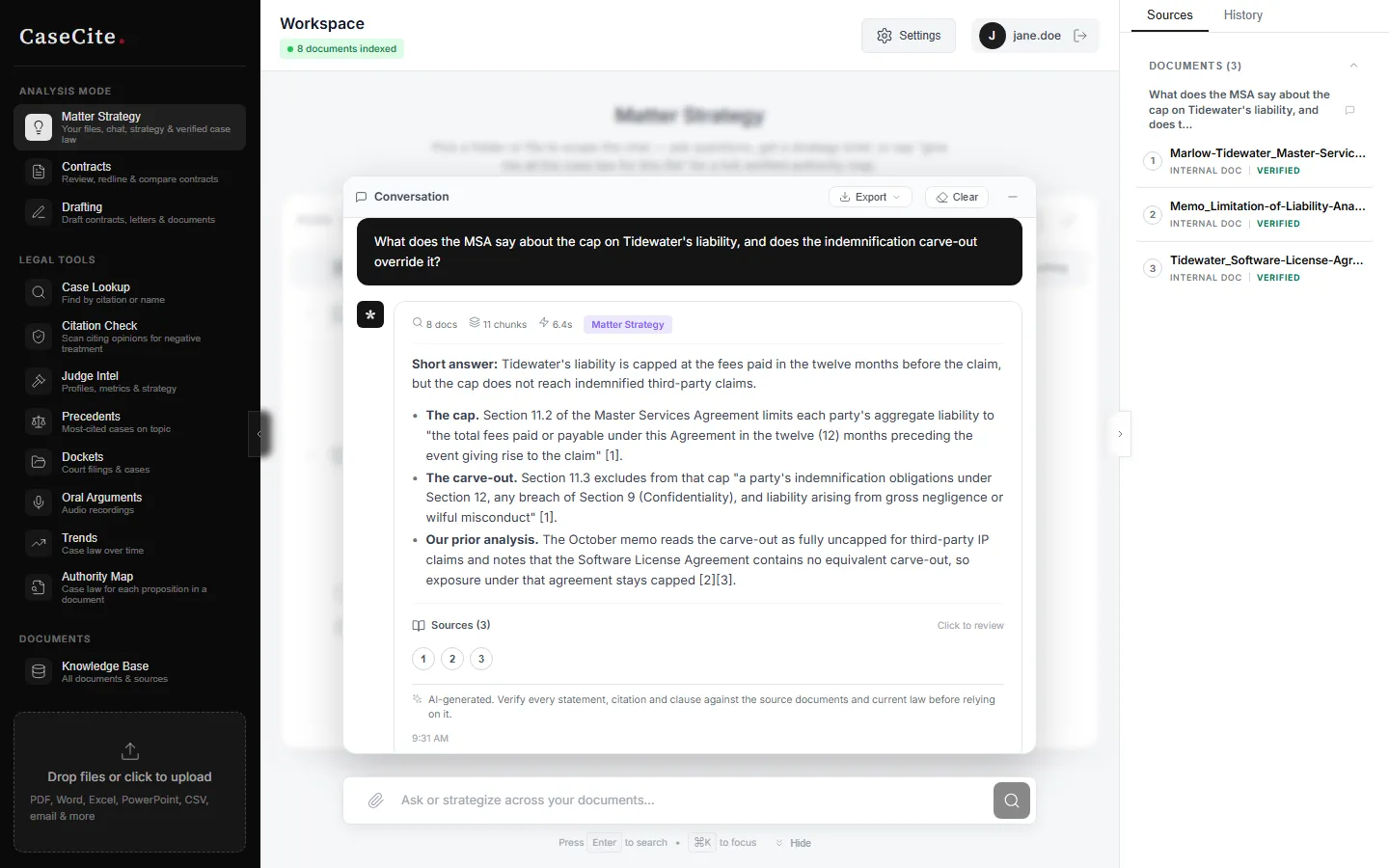
Short description
CaseCite is an open-source legal AI platform that a law firm installs on its own server. It launched publicly with a landing page headlined "Sorry, Harvey. We object to your pricing," which pitches it as a free alternative to Harvey. The page also says it isn't affiliated with Harvey AI.
You upload documents or import them from Google Drive, OneDrive, Box, Dropbox, Filevine or Clio, and CaseCite indexes them. You can then chat with your documents and get answers that cite the source passage, run deep research plans, review and compare contracts, export redlines as Word tracked changes, draft long agreements from up to four earlier documents, and review hundreds of contracts in one table. Case law, citation checks, dockets and judge analytics come from CourtListener, a free public case-law database. The maker says it doesn't replace Westlaw or Lexis.
Documents, the search index and chat history stay on your server. The AI features send text to the providers you set up (OpenAI, Anthropic or Gemini) under your own API keys (the access codes providers bill against), or to compatible models you host yourself. There are no per-seat fees, so you pay only for hosting and AI usage. Thomas Unise, a consultant in Minneapolis-St. Paul, Minnesota, builds it and also sells paid installs. Version 1.0.0 is dated February 2026, the code went public on GitHub in August 2026, and it moved from the Elastic License 2.0 to the Apache 2.0 license on October 28, 2026.
Features
Cited research chat: Ask questions about your firm's documents and get answers with citations pointing to the source passage. A second check labels each claim as supported, partial, contradicted or unsupported by its quote.
Meaning and keyword search combined: CaseCite searches your documents two ways, by meaning and by exact keywords, and merges the two result lists. Documents are split at articles, sections and clauses, and each piece keeps its section and page number.
Deep research: A planner suggests 3 to 8 sub-questions, which you can edit before anything runs. Each one is researched across your documents and CourtListener, quotes are checked against the source text, and a step log records what was searched.
Contract review and redlining: Analyze a contract, chat with it, compare 2 to 4 contracts clause by clause against a baseline, and export the redline as real Word tracked changes. A character-by-character check refuses to export a redline whose text doesn't match the original.
Contract tables: Pull the same fields out of hundreds of contracts into one table, with every value linked to the passage behind it. Reviewers can override, approve, flag or add notes, and the table exports to Excel, CSV or JSON.
Long-document drafting: Draft from up to four reference documents. For long drafts such as a 30-page agreement, you approve a section plan first, each section is written separately, and the sections are then reconciled.
Saved workflows: Save a process (extract fields, analyze, compare, draft, deep research, citation check, approval step) and run it on a set of documents as one background job. Three starter templates cover NDA intake, lease review and a due-diligence pass.
Case law and judge information: Case lookup, citation check, precedents, dockets, oral arguments, case-law trends and judge analytics, all from CourtListener. You can open an opinion and chat with it.
Matters: One workspace per client engagement that holds its documents, chats and analyses, with member access, an activity feed, matter facts and ownership transfer.
Practice profile: Describe what you practice, CaseCite drafts a profile of what matters in that work, and you edit it. The profile is used as background in every review, redline and draft.
Security controls: Uploaded files, API keys and connector sign-ins are stored encrypted (AES-256-GCM). Sign-in can require a code from an authenticator app, permissions are set by role, sessions last 8 hours with a 2-hour idle timeout, and an audit log is chained so later tampering shows up.
Bring your own models: Use OpenAI (default chat model gpt-5.5, with gpt-5.4-mini for small tasks), Anthropic Claude or Google Gemini for chat. Embeddings, the step that turns text into searchable data, can come from OpenAI, Voyage, Cohere or a server you run. Any OpenAI-compatible model server such as Ollama, vLLM or LM Studio also works, and you can pick separate models for chat, small tasks, research and drafting.
Pricing
The software is free. Your costs are the server you run it on and the AI usage that OpenAI, Anthropic or another provider bills to your own account.
Self-hosted: $0, with no per-seat fees, under the Apache License 2.0. You pay for your own server and for AI usage on your own provider accounts.
CourtListener API token: Free, and required for citation checks. The other case-law tools work without it but are heavily rate-limited, meaning only a small number of lookups are allowed in a given time.
Done-for-you install: Available from the maker, scoped and priced after a call. The price isn't published.
Support contract: Available separately after go-live. The price isn't published.
Hosted plan: None. The repository's support page says "There is no hosted service."
Integrations
Platforms: A web app you host on your own server with Docker, a Microsoft Word add-in for Word on Windows, Mac and the web, and a REST API for connecting other software. There's no hosted version, and the research doesn't mention a mobile or desktop app.
Google Drive, OneDrive, Box and Dropbox: Import documents through an ongoing sync or a file picker. Microsoft and Google connections ask for read-only access.
Clio and Filevine: Document import. Filevine uses one firm-wide API key, stays off until an admin turns it on, and is then limited to admins.
iManage and NetDocuments: Connectors exist but are experimental, haven't been tested against a live account and are off by default.
Microsoft Word add-in: Analyze the open document, jump to flagged passages, insert rewrites as tracked changes and add research answers as paragraphs with footnotes. It needs Microsoft 365 or Office 2021 or later and a CaseCite server reachable over HTTPS.
CourtListener: The only case-law source, used for case lookup, citation checks, dockets, oral arguments and judge analytics.
AI providers: OpenAI, Anthropic, Google Gemini, Voyage AI and Cohere (embeddings and optional Cohere reranking, which reorders search results by relevance), Pinecone as an optional search database, plus any self-hosted model server that accepts OpenAI's request format.
Azure AD: Supported only as a behind-the-scenes token exchange. There's no "sign in with Microsoft" button yet, and SAML, generic OIDC and SCIM, the standards firms use for company-wide sign-in and user management, aren't supported.
Platforms
- Self-hosted web app
- Microsoft Word add-in
- REST API
Frequently asked questions about CaseCite
Is there an open source alternative to Harvey AI?▼
CaseCite is one. Its code is on GitHub under the Apache License 2.0, a recognized open-source license, so a firm can host, modify and share it, including for commercial use, as long as it keeps the license and copyright notices. It covers research over your own documents, contract review and redlining, drafting and case-law tools. Versions up to 1.3.0 were released under the Elastic License 2.0, and that license still applies to those versions.
Is there a free legal AI tool for law firms?▼
CaseCite is free to host yourself, with no per-seat fees, no annual contract and no sales call. The costs are your own server and the AI usage billed by the providers you connect, such as OpenAI or Anthropic. Running it needs Docker and Docker Compose, and a free CourtListener API token unlocks the case-law tools. If your firm wants it installed for you, the maker prices that after a call.
Is CaseCite confidential? Does client data leave the firm?▼
Documents, the search index, chat history and analyses are stored on your own server. Nothing is sent to the CaseCite maintainers, and there's no usage tracking. The AI features do send content out: when you upload a document, its text goes to your embeddings provider (OpenAI by default), and your question plus the relevant passages go to your chat model. To keep document text on your own network, point both the chat model and the embeddings model at servers you host. CaseCite holds no SOC 2, ISO 27001 or HIPAA certification, and derived text such as the search index and chat history depends on disk encryption you set up.
Which AI models does CaseCite use?▼
It works with OpenAI, Anthropic Claude or Google Gemini for chat, using API keys your firm or each user provides. The default OpenAI chat model is gpt-5.5. Embeddings can come from OpenAI, Voyage, Cohere or a server you run. Any OpenAI-compatible model server works, including Ollama, vLLM or LM Studio, and an admin can pick different models for chat, research, drafting and small background tasks. An allowlist limits which providers can be called.
Can CaseCite redline contracts and replace legal research tools?▼
It can review a contract against your practice profile, compare it clause by clause with your standard agreement, and export the redline as Word tracked changes. It doesn't replace Westlaw or Lexis. Its case-law source is CourtListener, and its citation check scans citing opinions for negative treatment; the maker says it isn't a substitute for Shepard's or KeyCite. Every answer, analysis, redline and draft carries a notice to verify it against the sources and current law, and the maker calls it a research aid that doesn't replace a lawyer's judgment.
Similar tools
Alternative AI options