
OpenGamma
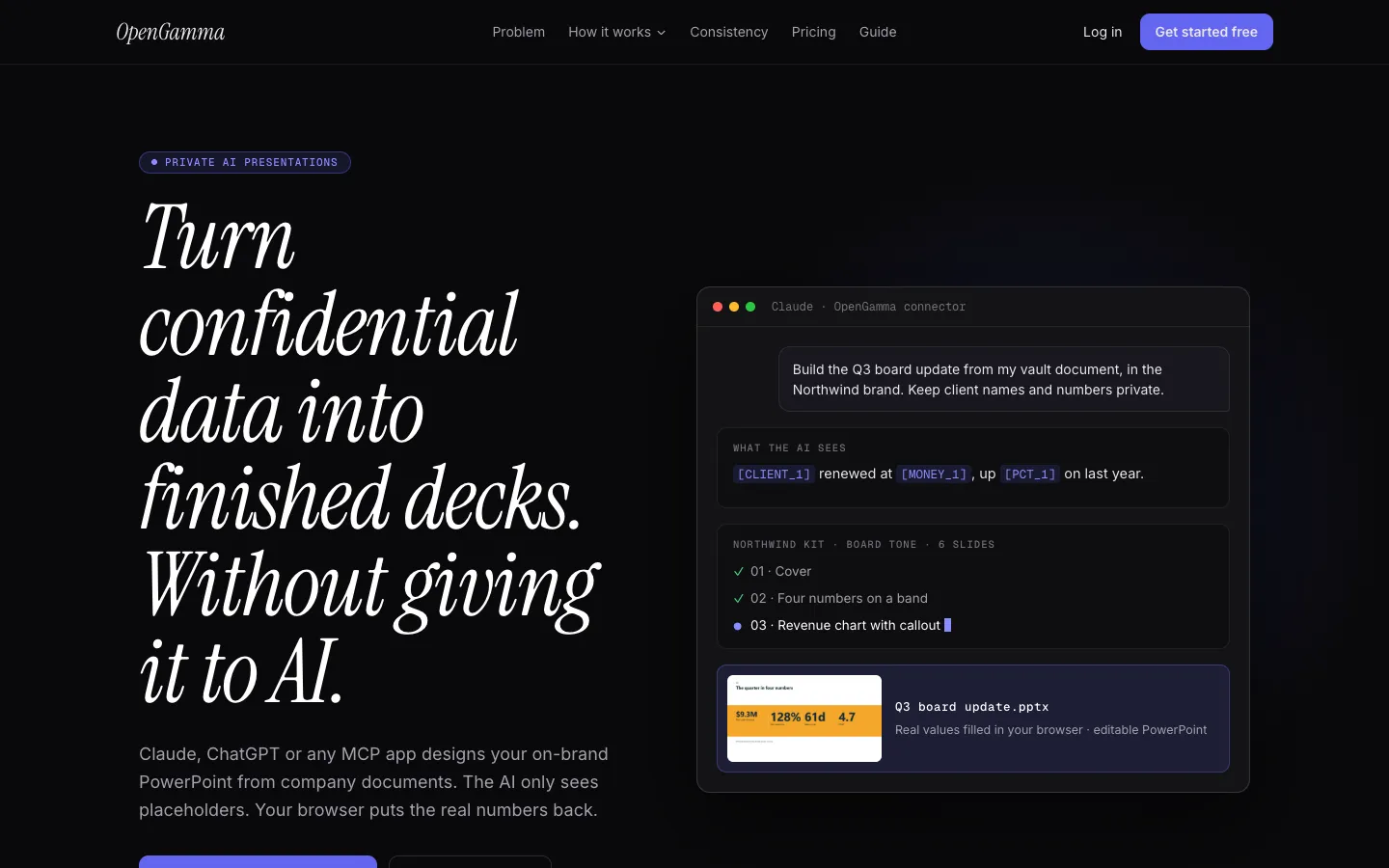
A connector where Claude, ChatGPT or another MCP app designs on-brand, editable PowerPoint decks from your confidential documents while the AI sees only placeholders, and your browser puts the real names and numbers back when you export.
Short description
OpenGamma is a private AI presentation maker for decks you can't paste into a chat, such as board updates, client pitches, financial planning reviews and HR reviews. You add a document to its Privacy Vault. Your browser encrypts it with AES-256-GCM, a standard strong encryption method, and swaps names, companies, amounts, dates and percentages for placeholders like [CLIENT_1] and [MONEY_1]. You review that placeholder version block by block, then ask your own AI app to build the deck through the OpenGamma connector.
The AI writes the story and picks layouts without seeing the hidden values. When you export, your browser decrypts the document, fills the real values back in and creates a native .pptx file on your computer, with editable charts and animations. Blind mode goes further and shares only structure, such as block lengths, table shapes and trends. A brand kit imported from your PowerPoint template applies your colours, fonts, logos, tone of voice and layout rules to every slide.
OpenGamma doesn't include its own AI model. You bring Claude, ChatGPT or another app that supports MCP, a standard way for AI assistants to use outside tools. Shoumik Goswami built it. The company is based in India, the service runs on Oracle Cloud in Mumbai, and it was featured on BetaList in October 2026.
Features
Placeholder masking: In Masked mode, your browser replaces emails, links, phone numbers, amounts, percentages, dates, codes and your own list of terms with labelled placeholders. Names of people, companies and places are found by a small language model that runs on your device, so your text isn't sent anywhere to be checked.
Blind mode: For the most sensitive material, the AI sees no text at all, only block IDs, lengths, table shapes, column types and trends (rising, falling, flat or mixed).
Review before sharing: You check the exact placeholder version the AI will get. Words that look unusual but weren't hidden are underlined so you can hide them in one click.
Real values restored in your browser: The finished deck is filled with real values in your browser on OpenGamma's site, never inside a chat window, and the .pptx file is created on your computer without being uploaded.
Encrypted Privacy Vault: Documents are encrypted in the browser and only the scrambled version is stored. Your vault key is protected by your passphrase (PBKDF2-SHA256 with 600,000 rounds) and a recovery key you download. The vault holds up to 20 documents and 500 MB.
Local mode: Mask a file without storing it in the vault. The original stays on your device, the masked version passes through the server in memory for up to 30 minutes, and real values stay in your browser's local storage for 7 days.
Brand kits from your template: Import a PowerPoint template to bring in your colours, fonts, logos, footer and design style. Off-brand colours and fonts are rejected.
Tone of voice and layout rules: Set how you write, words you never use and your citation style. Contrast, text density and layout are checked on every slide before you see it.
Editable PowerPoint files: Downloads .pptx files with editable text, native charts and real animations. Core adds PDF export and motion clips.
Decks from several documents and private photos: Build one deck from up to five vault documents. Photos are encrypted too. The AI sees only a photo's shape and a masked caption, and the picture is added when you export.
Emails, summaries and reports: The same masking works for client emails, board summaries and reports, which you copy or download as Word files with real values filled in.
Leak tests on every release: Automated tests plant secret values in a vault, then search the database, file storage, logs and every AI response for them.
Pricing
OpenGamma charges for its own app only. The AI that designs your slides runs on your existing Claude, ChatGPT or other MCP app plan.
Free: $0. 1 brand kit, 3 decks a month at up to 20 slides each, native animations, and a small OpenGamma credit on the last slide. The Privacy Vault isn't included.
Core: $4.99 a month or $49 a year (about $4.08 a month). Privacy Vault with Masked and Blind modes (20 documents, 500 MB encrypted), 3 brand kits with template import, 60 decks a month at up to 40 slides each, 10 motion clips a month, PDF export and no credit slide.
Free trial: Every new account gets 30 days of Core free with no card. When it ends the account moves to Free unless you subscribe. Your content is kept, but Core-only features are locked.
AI usage: Not included. You use your own Claude, ChatGPT or other MCP app plan.
Integrations
Platforms: Web app, used through an MCP connector inside your AI app. Exports .pptx files, plus PDF on Core. The research doesn't mention a mobile or desktop app.
Claude: Works as a connector inside Claude, which builds the deck from your vault document and brand kit.
ChatGPT: The same connector workflow inside ChatGPT.
Other MCP apps: Works with other AI apps that support MCP connectors.
Microsoft PowerPoint: Imports your .pptx template for the brand kit and exports native, editable .pptx files.
Microsoft Word: Emails, summaries and reports download as Word files.
Openverse: Suggests openly licensed stock images when a deck needs them, sending only the search terms.
Google Fonts: Loads fonts for brand kits that use them.
Platforms
- Web
- MCP connector for Claude
- ChatGPT and other AI apps
Frequently asked questions about OpenGamma
Is ChatGPT safe for confidential information?▼
On a personal plan, usually not. OpenGamma's guide notes that ChatGPT Free, Plus and Pro may use your chats to train OpenAI's models unless you turn off "Improve the model for everyone", while ChatGPT Business and Enterprise don't train on your content by default. Even with training off, the data still sits on the provider's servers and may break a company policy or a client NDA. OpenGamma avoids the problem for decks by giving ChatGPT placeholders such as [CLIENT_1] instead of the real values.
How do I use AI with confidential data?▼
Keep the sensitive values away from the AI. In OpenGamma, your browser encrypts the document and swaps names, amounts and dates for placeholders. You approve exactly what the AI sees, and your browser restores the real values afterwards. Placeholders hide values but not context, so for the most sensitive files Blind mode shares only structure, such as block lengths, table shapes and trends. Masked text is pseudonymized, meaning the values are replaced with stand-ins rather than made fully anonymous, so GDPR still applies.
Can Claude create PowerPoint presentations?▼
Yes, with a connector. OpenGamma connects to Claude, as well as ChatGPT or any MCP app, so you can ask for something like "Build the Q3 board update from my vault document, in the Northwind brand". Claude designs the slides, and you download a native .pptx with editable text, charts and animations. OpenGamma says connecting takes about two minutes.
How do I generate PowerPoint slides with AI that match my brand?▼
Import your PowerPoint template into an OpenGamma brand kit once. It brings in your colours, fonts, logos, footer and design style, and you can add tone of voice rules and words you never use. Off-brand colours and fonts are rejected, and contrast, density and layout are checked on every slide. Free includes 1 brand kit and Core includes 3.
Can I make a PowerPoint with AI for free?▼
Yes, within limits. OpenGamma's Free plan gives 3 decks a month at up to 20 slides each with 1 brand kit, but adds a small credit on the last slide and doesn't include the encrypted Privacy Vault. New accounts get 30 days of Core free with no card. You also need your own AI app, such as Claude or ChatGPT.
Similar tools
Alternative AI options