
Glitter AI
SOP software that turns a screen recording, an uploaded video or a document into a written step-by-step guide with screenshots and a trimmed video, adds AI voiceover and an AI avatar on its Scale plan, and bills only the people who create guides while readers stay free.
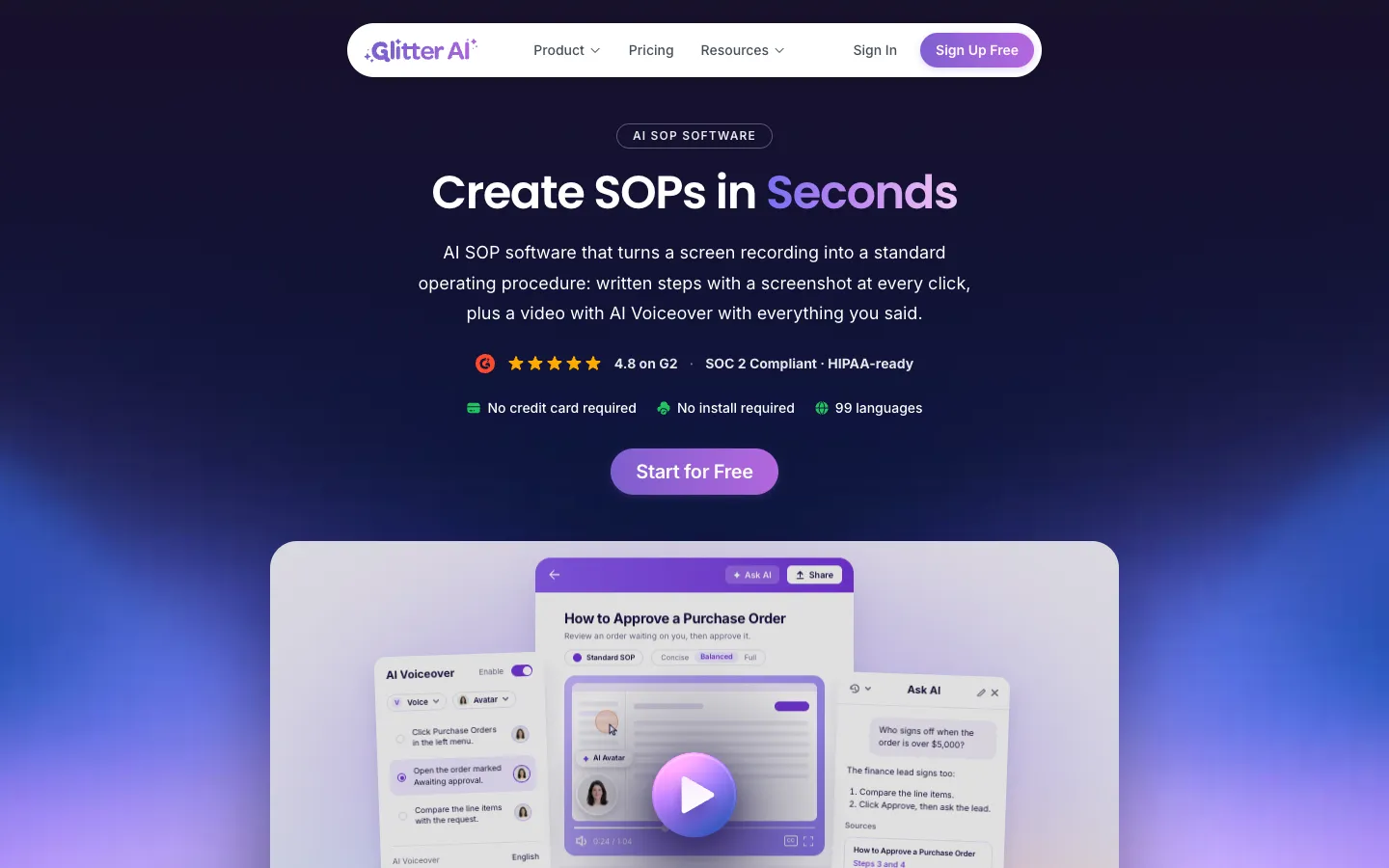
Short description
Glitter AI writes standard operating procedures (SOPs) while you work. You do a task once and it records you, either in the browser with nothing to install, through a browser extension, or with the Mac and Windows desktop app for programs like Excel or SAP. You get numbered steps with a screenshot at each click, your narration as text, and the trimmed video kept beside the guide. It can also work from recordings you already have, including meeting recordings and footage of someone doing a physical task, and it imports Word, PDF, PowerPoint and text files.
On the Scale plan, Glitter can narrate a guide with an AI voice in 99 languages, put an AI presenter on screen, translate whole guides and sync them to knowledge bases. Ask AI answers questions from your SOPs and links to the step it used. Assistants such as Claude, ChatGPT and Cursor can read your guides over MCP.
Paid plans count creators only, and any number of people can read guides for free. That is the main point Glitter makes against Scribe. It's built for operations, IT, compliance, customer success and onboarding teams. Glitter AI, Inc. is run by founder and CEO Yuval Karmi, who earlier founded and sold Simpo. The about page says he started building Glitter in 2024, while the changelog dates the start of development to September 7, 2023. The only address the company lists is a registered office in Dover, Delaware.
Features
Written SOP from one recording: Captures clicks, typing and voice in one pass, then writes numbered steps with a screenshot at each click and your narration transcribed. Glitter says going from recording to finished SOP takes under 2 minutes.
Three ways to record: A browser recorder for Chrome or Edge with nothing to install, an extension that also catches tab switches and URL changes, and a desktop app for Mac and Windows software such as Excel, SAP or an ERP.
Video to SOP: Upload a meeting recording, screen capture, phone screen recording or live footage of a physical task, and Glitter writes the guide from it.
Document import: Turns Word, PDF, PowerPoint, Excel, Markdown and text files into step-by-step SOPs, on Growth and above.
AI Voiceover and AI Avatar: Writes narration from the guide (an intro from the title, then a line per step timed to the clicks) in 99 languages, and can add an AI presenter on camera. Both come with Scale. A custom avatar is an Enterprise feature.
Video editing next to the guide: Trim, crop and background panels with a timeline under the player. Each guide can be set to Concise, Balanced or Full detail, and an AI rewrite costs 1 credit.
Translation into 99 languages: Translates the steps and the narration in one click, on Scale.
Ask AI: Editors and viewers ask questions and get answers drawn from your SOPs, with a link to the exact step or moment in the video.
MCP, API and webhooks: MCP (Model Context Protocol, a standard way for assistants like Claude to read your data) lets AI assistants search your guides. There's also a read-only REST API with scoped keys that returns guides as JSON or Markdown, and signed webhooks for guide and member events.
Redaction and on-device blur: Every plan has a screenshot editor with redaction. On-device blur hides sensitive data in the desktop app before anything is uploaded, on Enterprise or as a $200/month add-on.
Sharing and exports: Readers open a shared link without an account, and guides can be embedded in websites, knowledge bases or LMS platforms. Growth exports to PDF, Word and Markdown; Scale adds PowerPoint and SCORM.
Security: SOC 2 Type II, AES-256 encryption, US data centers and SOPs private by default. Glitter says it never trains AI on customer content.
Pricing
Paid plans charge for creators, meaning the people who record, edit and publish. Viewers are unlimited and free on Growth, Scale and Enterprise. Paying yearly is 37% cheaper than paying monthly.
Free: $0 with no card and no time limit. You get 3 guides in total, up to 5 minutes each, and 15 minutes of video overall that never expires, for up to 3 creators. Those 3 guides can use Scale features and carry a Glitter watermark. The plan card mentions unlimited free viewers but also lists 3 viewers, and the FAQ says a Free team holds 3 people in all.
Growth: $249/month billed yearly, or $399/month billed monthly. Includes 3 creators, unlimited guides up to 1 hour each, and 15 hours of new video a month shared by the team. Adds PDF, Word and Markdown export, document and video import, Ask AI, speech-to-text, API access and MCP. Extra creators cost $29/month on yearly billing or $39/month on monthly.
Scale: $499/month billed yearly, or $799/month billed monthly. Includes 5 creators, guides up to 2 hours each and 30 hours of video a month. Adds AI Voiceover, AI Avatar, version history, translation into 99 languages, knowledge base sync, and PowerPoint and SCORM export. Extra creators cost $39/month yearly or $49/month monthly.
Enterprise: From $999/month, billed yearly only. Creators and video hours are priced by volume and guides have no length limit. Adds a custom AI avatar, SSO, data governance controls, a HIPAA BAA, on-device blur, unlimited workspaces, an audit trail and help with onboarding. It can be invoiced on NET 30 terms.
Add-ons for Growth or Scale: Monthly prices are SAML SSO $300, HIPAA BAA $350, custom templates $300, on-device blur $200, audit trail $150, secure embeds $150, offline playbooks $150, PowerPoint export $100 and SCORM export $100.
Refunds and cancelling: Paid self-serve plans have a 7-day money-back guarantee. You can cancel anytime, and upgrades are prorated.
AI credits: Some AI actions use credits (an AI rewrite is 1 credit, and avatar costs show before you apply one), but the pricing page doesn't say how many credits each plan includes or what extra credits cost.
Integrations
Knowledge bases: Syncs guides to Intercom, Zendesk and Notion on Scale, and embeds them in Confluence and other knowledge bases.
Learning platforms: SCORM export, a package format that learning management systems can import, on Scale or as a $100/month add-on.
AI assistants: Claude, ChatGPT, Cursor, Copilot Studio or any other MCP client can search and read your SOPs using your sign-in.
REST API: A read-only API with scoped keys that returns guides as JSON or Markdown.
Webhooks: Signed endpoints for guide and member events, retried when delivery fails.
Single sign-on: SAML SSO on Enterprise, or as a $300/month add-on.
Platforms
- Web
- browser extension for Chrome
- Edge
- Arc
- Brave and other Chromium browsers
- macOS
- Windows
- API
What users love about Glitter AI
A guide in minutes: Early users say they talk through a task while clicking and get a step-by-step guide with screenshots and text. One says a guide that used to take an hour took about 10 minutes.
Fewer calls explaining the same process: A reviewer says it cut the calls where they walked colleagues through the same steps again, and that the guide was easy to edit and share.
Steps accurate enough to share after a quick edit: Users describe the generated steps as accurate, needing only light editing before they go out.
Help docs that ship with the release (vendor testimonial): A product team says it now publishes documentation at the same time as new features, and another customer made more than 60 onboarding articles that went into their CMS without trouble.
Easier to keep current than video (vendor testimonial): A customer documenting a messy Salesforce setup says written steps are easier to update than a video alone.
Frequently asked questions about Glitter AI
Is Glitter AI free?▼
Yes, there's a free plan with no credit card and no time limit, though it's small: 3 guides in total, each up to 5 minutes, and 15 minutes of video overall. Those 3 guides can try Scale features and carry a Glitter watermark. Exports, unlimited guides and AI voiceover need a paid plan.
How much does Glitter AI cost?▼
Growth is $249/month billed yearly ($399 if you pay monthly) for 3 creators and 15 hours of video a month. Scale is $499/month yearly ($799 monthly) for 5 creators and 30 hours of video, plus AI voiceover, avatars and translation. Enterprise starts at $999/month on yearly billing. Every paid plan includes unlimited free viewers, and each extra creator costs $29 to $49/month depending on plan and billing.
What is the difference between Glitter AI and Scribe?▼
The biggest difference is who you pay for. Glitter's comparison page says Scribe's Pro Team plan bills every member, including people who only read guides, at $13 per seat per month on yearly billing with a 5-seat minimum, while Glitter bills only creators. By Glitter's own figures, Scribe is cheaper for a team of 5 ($65 against $249 a month), and Glitter becomes cheaper at around 20 people. Glitter also turns uploaded videos and documents into SOPs and keeps a video with each guide, which its page says Scribe doesn't do.
Does Glitter AI have a browser extension or desktop app?▼
It has both. The extension works in Chrome, Edge, Arc, Brave and other Chromium browsers, but not in Safari or Firefox. The desktop app runs on Mac and Windows, is meant for desktop software like Excel or SAP, and is included on the free plan. You can also record in Chrome or Edge without installing anything.
Can Glitter AI turn a video into an SOP?▼
Yes. Upload an existing recording, such as a meeting recording, a screen capture, a phone screen recording or footage of a physical task, and Glitter writes a step-by-step guide from it. Video import comes with Growth and above, where a guide can run up to 1 hour, or up to 2 hours on Scale.
Similar tools
Alternative AI options