One-click Teaching
A web app for parents, tutors and students that turns workbook photos, PDFs, notes and videos into organized topics, practice tests and audio or video explainers told by a character, with a private space for each learner and tests that open from a link with no account.
Short description
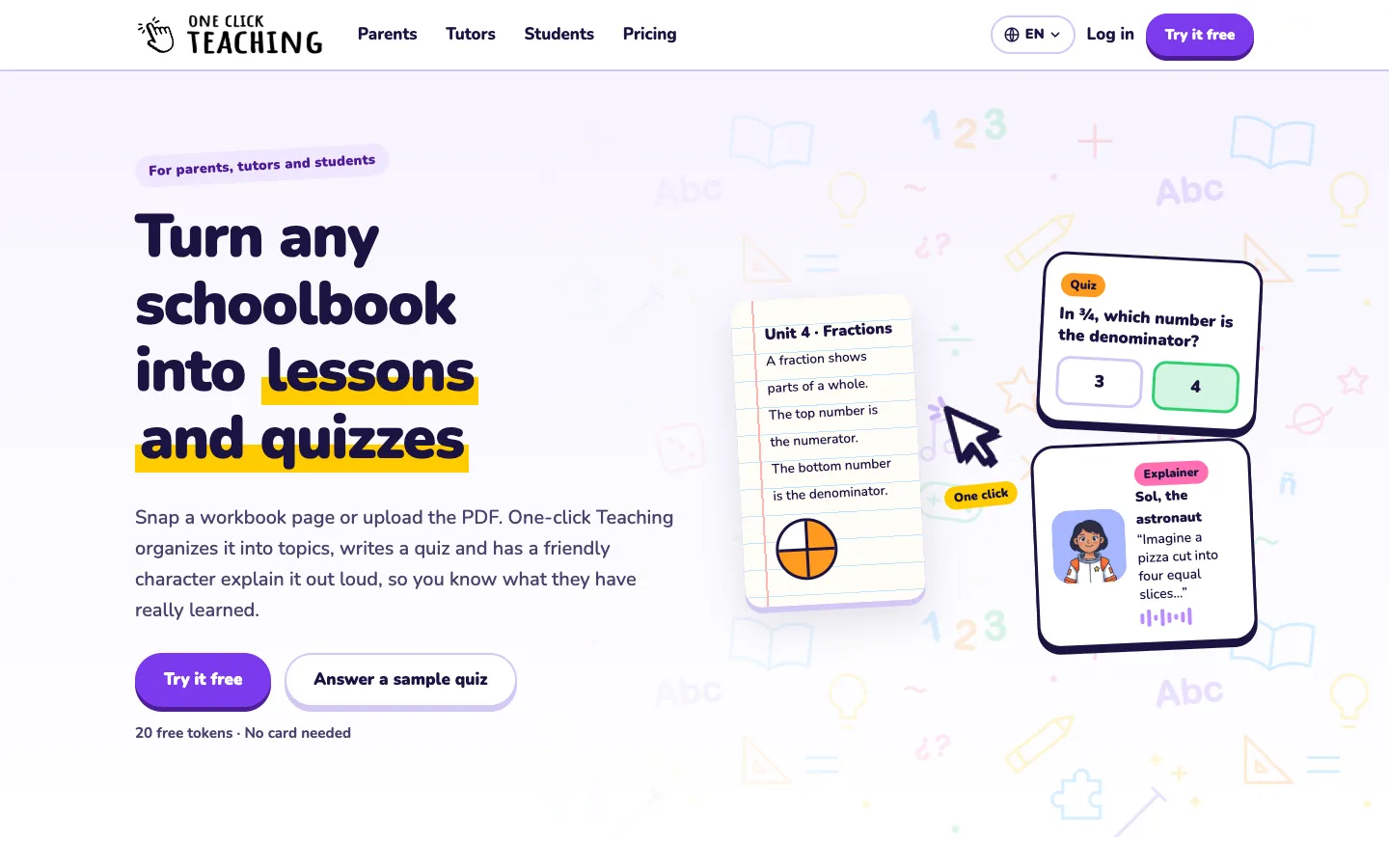
One-click Teaching is an AI study tool that works from the material a learner already has. You add workbook pages (as photos), PDFs, documents, web pages or videos to a private repository. It sorts them into a knowledge base: the course topics in the order they're learned, with notes, versions and suggestions you can edit before you save.
From those topics you can make practice tests with multiple choice, true/false and open questions. You can also make explainers, where one of ten characters (a teacher, an astronaut, a robot or an owl, among others) talks through a topic in audio or video. Learners can ask the explainer follow-up questions by typing or speaking. Tests are shared by link with no login or printed, and the adult marks progress one topic at a time.
The app is set up for three kinds of users. Parents get one space per child, built from that child's own schoolbooks. Tutors and coaches get a space per student or one shared space for a group, and students get their own space for notes, slides and readings. Each learner also has a calendar for tests, classes and breaks, and it can pick up dates from a photo of a school note.
The app is in English and Spanish, and explainers come in English, Spanish or Portuguese. AI work is paid for with tokens (credits that each AI action uses up), through a free plan, one-off packs or monthly plans. It's made in Argentina, run by Xbuilders LLC (a Delaware company), and launched on Uneed on November 3, 2026.
Features
Private material repository: Takes PDFs, photos of workbook or textbook pages, documents, web pages and videos, which it transcribes. You can also write content yourself with an AI helper that asks a few questions first. Only the owner and invited team members can open it.
Editable knowledge base: Sorts the repository into topics in learning order. Nothing is saved until you've reviewed the proposal, and you can move, rename or add topics. Each save goes into a change history, and a Suggestions view points out missing topics, basics that aren't covered or an order that would be hard to learn from.
Practice tests from chosen topics: Multiple choice, true/false and open questions on the topics you pick. You set the number of tries, a time limit and whether answers are shown, then share the test by link or print it as a PDF.
Character explainers in audio or video: Ten characters explain a topic out loud in a short, medium or long version, in English, Spanish or Portuguese, with a transcript. Video explainers can add lip-sync (the character's mouth moves with the words), which only paid tokens cover.
Ask the explainer: Learners can question an explainer by typing or speaking, and the character answers about that topic.
No account for learners: Learners open tests and explainers from a link with no login or email, which works for young children on a parent's tablet.
A space per learner or group: Each child, student or group gets its own space, courses and pace. A group space has one profile with an age range and level.
Progress tracking: A Tracking view shows how each learner did on each test, and the adult marks topics as mastered.
Calendar that reads dates from photos: Holds tests, practices, classes and breaks for each space, with weekly repeats, week, month and three-month list views, and printing. Take a photo of a school note or exam schedule and it finds the dates for you to confirm, and each entry links to its course and topics.
Course sharing between adults: Send another parent or teacher their own copy of a course or test to edit. The copy includes the topics, tests and explainers but never the original files, notes or learner data.
Team members share one balance: People invited to a teaching space spend from the owner's token balance, and each spend records who made it.
Pricing
All prices are in US dollars and billed by card through Stripe. In Argentina, packs and plans can be paid in pesos through Mercado Pago. No annual billing is published. Tokens are the credits each AI action uses up.
Free: $0, no card needed. 1 teaching space, 3 courses, 1 learner and 200 tokens to start. Tests and explainers by link work on the free plan, but lip-sync in video explainers needs paid tokens.
Family: $10 a month. 600 tokens a month (the vendor estimates about 5 full lessons), 3 teaching spaces, 10 courses and up to 3 learners. Unused tokens carry over.
Starter: $20 a month. 1,200 tokens a month (about 10 full lessons), 5 teaching spaces, 10 courses and up to 50 learners. Unused tokens carry over.
Pro: $50 a month. 3,500 tokens a month (about 29 full lessons), 15 teaching spaces, 40 courses and up to 150 learners. Unused tokens carry over.
Token packs (no subscription): 500 tokens for $13, 1,500 for $36 or 4,000 for $88. Pack tokens never expire, but the account keeps the free plan's limits of 1 space, 3 courses and 1 learner.
What things cost in tokens: Reading a PDF is 5 per page, and reading a photo, document or web page is 5. Organizing the knowledge base is 20 per 25 pieces, writing a test is 20, and an explainer is 40 (short), 60 (medium) or 100 (long). A learner's question to an explainer is 10, transcribing a video is 20, and reading dates from a photo into the calendar is 15. Lip-sync in a video explainer is 800, 2,000 or 3,600. Creating spaces, editing, sharing and tracking are free.
Free tokens: Up to 500 a month from referrals (250 per friend), the getting-started checklist (200), other people using courses you shared (20 to 50) and daily streaks (20 to 150).
School or enterprise plan: Not published.
Integrations
Payments: Stripe for cards in US dollars, and Mercado Pago for Argentine pesos, including monthly subscriptions.
Material sources: PDFs, photos, documents, web page links and video files. No school platform such as Google Classroom or Canvas, and no cloud drive, is listed as connected.
API: Not published.
Platforms
- Web
Frequently asked questions about One-click Teaching
How do I make a practice test from my notes?▼
Upload your notes, slides, readings or photos of handwritten pages to a course in One-click Teaching. It sorts them into topics, and you pick the ones you want tested. A test with multiple choice, true/false and open questions costs 20 tokens, and you can set the number of tries, a time limit and whether answers are shown.
Can AI make a quiz from a PDF?▼
Yes. One-click Teaching reads a PDF at 5 tokens per page and shows you the cost before it starts. Reading and organizing a typical 4-page chapter, plus one test and one medium explainer, uses about 120 tokens, which fits inside the 200 tokens the free plan starts with.
Is One-click Teaching free?▼
There's a free plan with one teaching space, three courses, one learner and 200 tokens, and no card is required. After that you can buy token packs, starting at $13 for 500 tokens that never expire, or move to a monthly plan from $10 (Family, with 600 tokens a month and up to 3 learners). If you run out of tokens, your existing courses, tests and explainers keep working, and only new AI actions have to wait.
Why use it instead of making a practice test on ChatGPT?▼
A general AI chat only sees your material if you paste it in each time. One-click Teaching keeps each learner's material in a private repository, turns it into a knowledge base you can reuse, and shares tests by link so learners can take them without an account. It also has character explainers that learners can question, a calendar for each learner and progress tracking by topic.
Can parents use AI to help kids with homework?▼
Helping parents is one of the three uses the site is built for. A parent photographs the workbook pages a child covered in class and gets a short summary of each topic. They can then send a quiz or a character explainer that the child opens on a tablet with no login. Each child has a separate space, so siblings with different books and grades never get mixed up.
Similar tools
Alternative AI options