OpenMathpix
A free, open-source Windows snipping tool that turns a screenshot of a formula into LaTeX on your own computer, offline after a one-time 120 MB model download and with no account or API key.
Short description
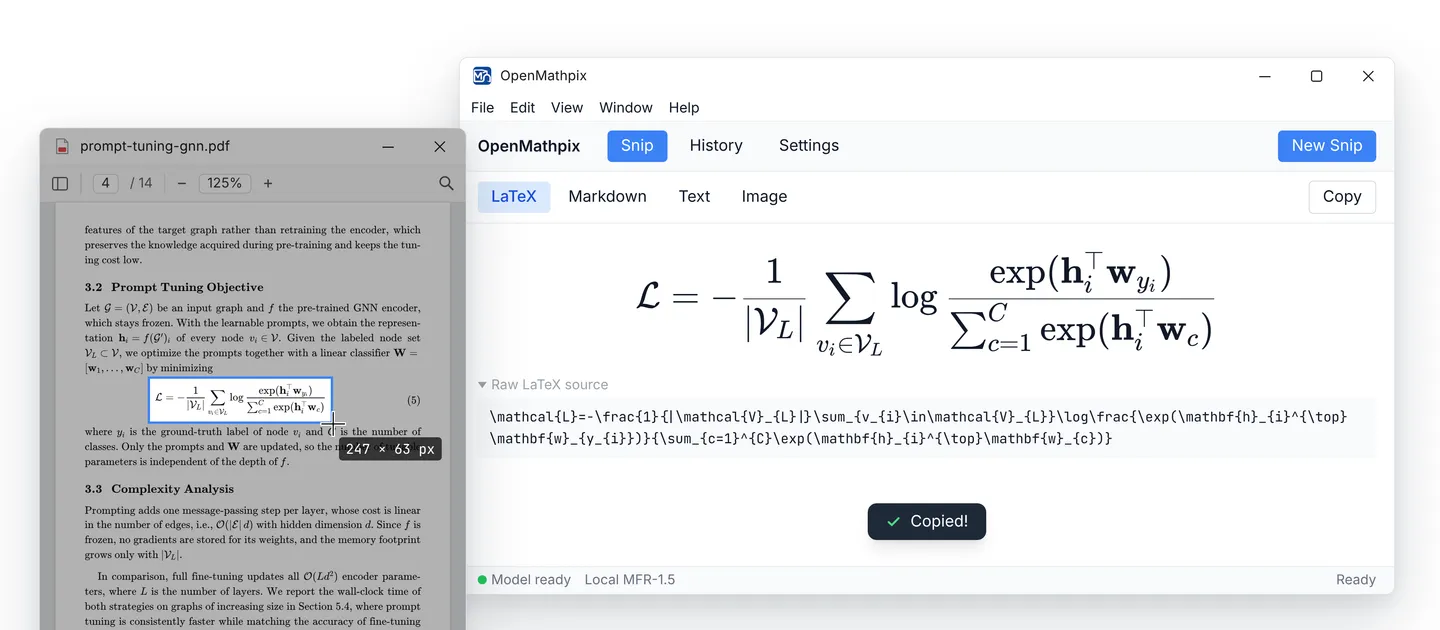
OpenMathpix is a snipping tool for people who need equations in LaTeX. Press Ctrl+Shift+S, drag a box around a formula anywhere on screen, and the app gives you the LaTeX source, the rendered math, a Markdown version and plain text. Your preferred format goes straight to the clipboard. You can also paste an image or drop one into the window.
Recognition runs on your own CPU with Pix2Text MFR-1.5, an open model built for reading math formulas. The first setup downloads about 120 MB from Hugging Face. After that it works offline, and you don't need Python, a graphics card, an account or an API key. The local model reads one cropped formula at a time. For full pages, tables or text mixed with math, you can connect PaddleOCR pipelines hosted on Baidu AIStudio (which need a Baidu account and an access token) or a PaddleOCR server you run yourself.
The only download is a portable Windows app, meaning it runs without installing. The code is open source under the AGPL-3.0 licence, which lets anyone use and modify it as long as changes they distribute stay open too. It was MIT licensed until November 8, 2026. The first release came out in March 2026, offline recognition arrived in October 2026, and the current version is v2026.11.01. A single developer, JhuoW on GitHub, builds it, and the interface comes in English and Simplified Chinese. It suits students and researchers who want Mathpix-style snipping without paying for a subscription.
Features
Snip a formula, get LaTeX: Click New Snip or press Ctrl+Shift+S from any app, then drag over the formula and let go. You can also paste an image with Ctrl+V or drop a file into the window.
Offline recognition on your CPU: The Pix2Text MFR-1.5 model runs in a background process on two CPU threads. It stays loaded while you snip and frees its memory after five minutes idle. Nothing gets sent to the cloud as a fallback.
One-time 120 MB model download: The app fetches the model from the official Hugging Face page, shows progress and checks each file's SHA-256 hash (a fingerprint that proves the file wasn't altered). It then tests the model and saves the setup by itself.
Import a model you downloaded yourself: If Hugging Face is slow or blocked on your network, download the eight model files in a browser and point the app at the folder. It checks every file and runs a test formula before switching over.
Four ways to see the result: LaTeX shows the rendered equation with copyable source, Markdown wraps it for notes, Text gives plain text and Image keeps the original capture. Your default format is copied after each snip.
Optional PaddleOCR for pages and tables: PP-OCRv5 reads plain text in Chinese, Japanese, Korean and English. PP-StructureV3 handles math, tables, charts and mixed layouts, and PaddleOCR-VL and VL-1.5 parse whole documents. These run on your Baidu AIStudio account or your own server.
Searchable history: Keeps your last 100 results by default, and you can set anywhere from 10 to 500. Each entry has a thumbnail, time and preview, and you can reopen any of them.
Encrypted token storage: If you add a PaddleOCR access token, the app stores it encrypted on disk.
Runs in the background: Minimize the window and the app keeps running, so the snip shortcut still works. The tray icon has Snip, Open Window, Settings and Quit.
Themes and two languages: Light, dark or system theme, and an English or Simplified Chinese interface that switches without a restart.
Settings that test themselves: A new model, API address or shortcut is checked before it replaces your working setup. If the check fails, the old setup stays in place.
Pricing
Free and open source: $0. The app, its source code and the formula model are all free, with no paid plan, account or usage limit for offline use. The code is AGPL-3.0 and the model is MIT licensed.
Optional PaddleOCR on Baidu AIStudio: Needs a free Baidu AIStudio account, an API address and an access token. AIStudio's limits and any prices aren't published in the project.
Self-hosted PaddleOCR: Point the app at your own server, such as http://localhost:8080, and leave the token empty. Running that server is up to you.
Integrations
Hugging Face: The app downloads the Pix2Text MFR-1.5 model from its official Hugging Face page on first setup, pinned to one tested version.
PaddleOCR on Baidu AIStudio: Connects to hosted pipelines (PP-OCRv5, PP-StructureV3, PaddleOCR-VL and PaddleOCR-VL-1.5) through your own API address and token. Each pipeline has its own address, so you update it when you switch.
Your own PaddleOCR server: Any PaddleOCR server you run yourself can be set as the API address.
Clipboard: Copies the LaTeX, Markdown or text result automatically after each recognition.
Platforms
- Windows
Frequently asked questions about OpenMathpix
Is there a free open-source alternative to Mathpix?▼
OpenMathpix is one. It's free, the source code is on GitHub under the AGPL-3.0 licence, and formula recognition needs no account, subscription or API key. It covers the main thing people use Mathpix Snip for, snipping an equation and getting LaTeX back, with the open Pix2Text MFR-1.5 model running on your own computer. Keep in mind that it's Windows only, one developer maintains it, and the project doesn't publish any accuracy comparison with Mathpix.
How do I convert a screenshot of an equation to LaTeX?▼
In OpenMathpix, download the local model once from Settings (about 120 MB). Then press Ctrl+Shift+S, drag a box around the formula and let go. The LaTeX shows up rendered and as raw source, and it's already on your clipboard. You can paste an image with Ctrl+V or drop in a file instead. Snip one formula with a small margin around it, since the local model doesn't read whole pages.
Does OpenMathpix work offline?▼
Yes, once it's set up. The first time, it needs internet to download the roughly 120 MB model from Hugging Face. From then on, formula recognition runs on your CPU with no connection and no cloud fallback. The optional PaddleOCR pipelines for text, tables and full pages are online services, so those need a connection.
Can it convert PDF pages, tables or handwriting to LaTeX?▼
The offline model can't. It reads cropped formulas only and doesn't handle mixed text, tables or page layouts. For those, you can connect PaddleOCR pipelines such as PP-StructureV3 or PaddleOCR-VL through a Baidu AIStudio account or your own server, and they return Markdown with LaTeX. The developer notes that complex layouts, handwriting and unusual screenshots still need checking by hand.
Is OpenMathpix safe?▼
All the source code is public on GitHub, so anyone can read what it does. In offline mode your images are processed on your own CPU and never uploaded. The model files come from the official Hugging Face page and are checked against SHA-256 fingerprints, and any PaddleOCR token you add is stored encrypted. The project doesn't mention code signing or a security audit, and a single developer maintains it.
Similar tools
Alternative AI options